
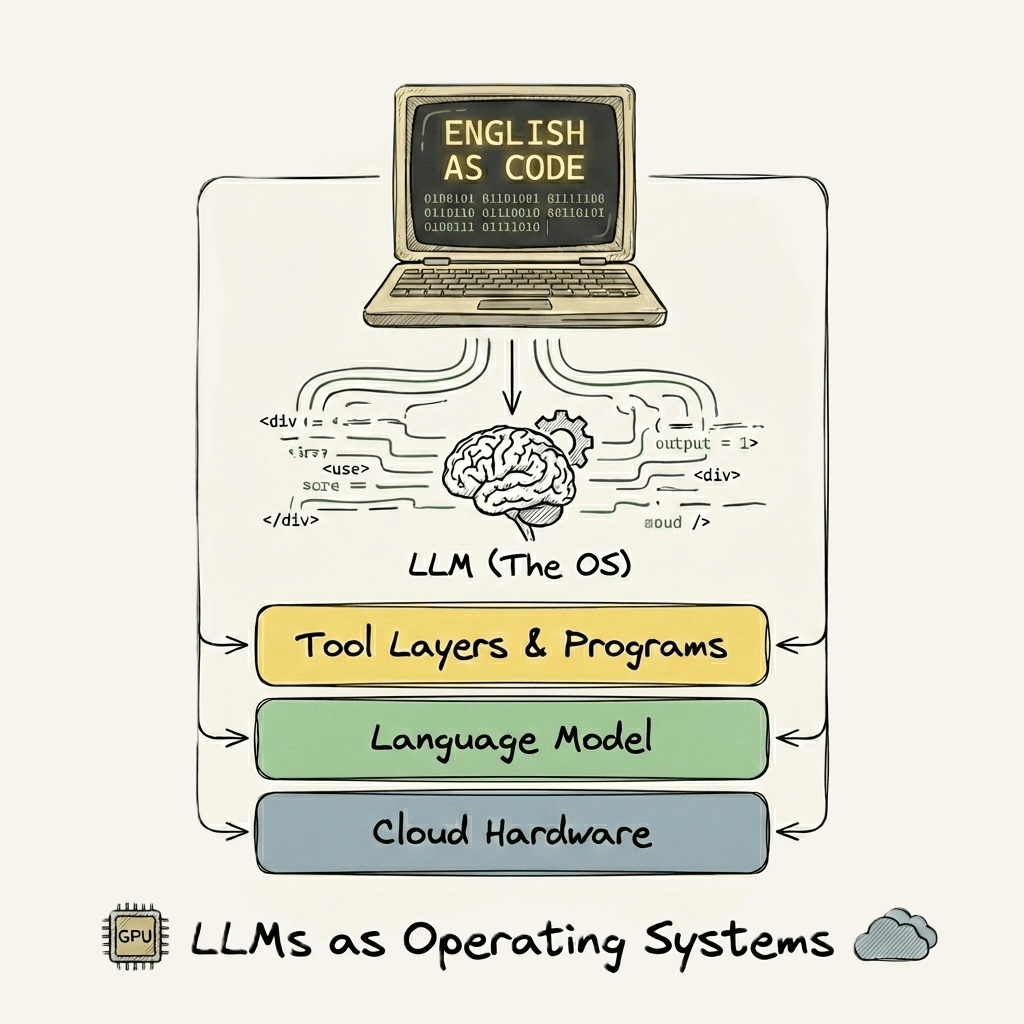
English is the hottest new programming language
When I first heard Karpathy’s line, “English is the hottest new programming language,” I did what most people seem to have done: I took it at face value. That was wrong. My mind immediately went to “vibe coding”, the now-familiar approach for non-programmers to tell an LLM what you need, in plain English, and getting back functioning code. Anyone can do this today and it’s undeniably useful.
But that’s not actually what the quote meant. And realizing the difference required me to step back and reframe how I thought about prompts, programs, and where exactly they “run.”
Default Mode—The Traditional Stack
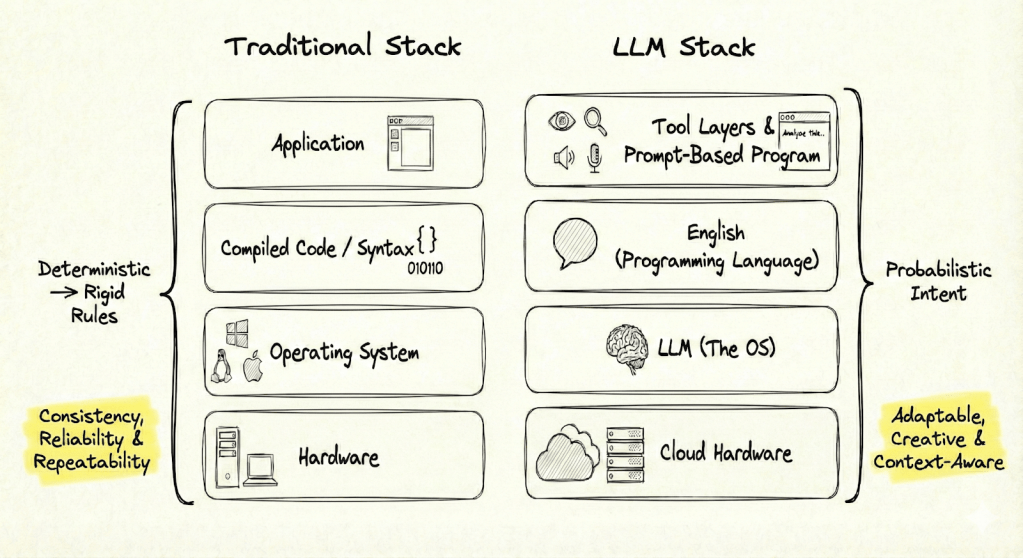
For as long as we’ve used software, the basic structure has been the same. Programs are written in a formal language, compiled or interpreted, and then run on an operating system that sits atop hardware. The whole point of this stack is predictability. You write code, you run it, you get the same result every time. If you don’t, it’s a bug.
That instinct for reliability is so baked in that it shaped my first reaction to the quote. We expect our tools to do exactly what we asked, no more, no less. If you hit “bold,” you get bold, you won’t get italics instead.
Consistent, reliable, repeatable outcomes: that’s the baseline software promise.
Paradigm Split—LLMs as a New OS
I have a few prompts that I consistently reuse. It dawned on me that my prompts were effectively little programs even though they read just like a simple set of instructions. But these programs didn’t run on Windows or macOS. They ran on a completely new kind of operating system: the model itself. If the old stack was hardware, OS, language, then app, the new stack swaps nearly every technical layer and is different top-to-bottom. What stays the same is your goal: describing what needs to happen.
Now, the “hardware” might as well be the cloud. The operating system? That’s the LLM. Programming language: English. Tools add another layer, vision, voice-to-text, internet search, each one expands what a “program” might mean in this environment.
When I designed prompts that actually run on this new substrate, I noticed the boundaries move for what counts as a program and what counts as repeatable and predictable. Here lies endless opportunity, and you don’t need as much creativity as you think, you just need problems you want to solve. We’ve got no shortage of those. And since I failed to get the LLM to fold my laundry I tried aiming it at work problems instead.
Three Ways to Run a Program (on an LLM)
To make this idea less abstract, here are three real examples that treat the LLM as a kind of operating system where instructions written in English behave like programs. Each one shows a different boundary:
- A workflow you could automate with traditional code, but becomes much easier as a prompt-driven program.
- A process that can only work on an LLM, where no combination of regular software would do the job.
- A program that adds external tools, like internet search, to create results traditional scripting can’t reach.
Let’s start with the first case.
Example 1: What Traditional Code Could Do, Prompts Do More Flexibly
Each month, we needed to reconcile two large CSVs, zillions of rows, lots of manual checks, a few hours and 100 clicks. We dropped the files into an LLM chat and provided the prompt (the step-by-step instructions), the model first wrote the python code then executed it on the files. ChatGPT did all the filtering, data manipulation, existence and completeness checks, and output a .csv exception report in the format we needed.
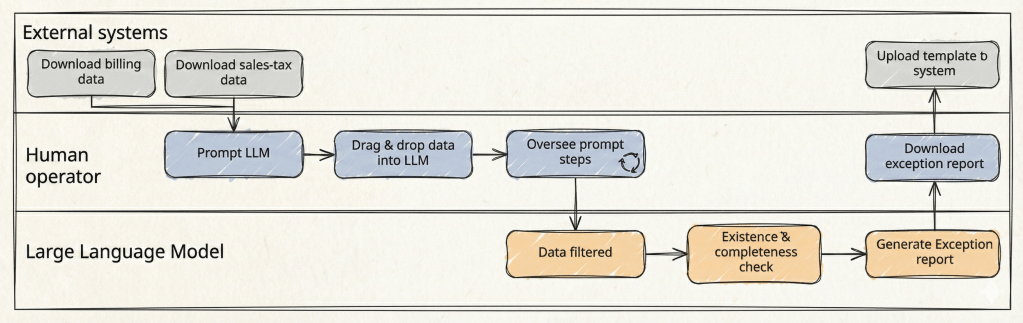
The same actions you’d expect from a macro or a script was now in a prompt: no programming needed. The LLM became the platform, and the process ran end-to-end with just a prompt and a file upload. If the data shape changes, you fix the workflow in plain English; you’re never required to debug code.
Example 2: A Program That Only Runs on an LLM
Processing foreign mail used to be a minor dread (ok – I actually hated it). Most of it arrived in languages I don’t read, often as scans or screenshots, and would lose all structure if pasted into Google Translate. Just figuring out what each document meant, and whether it required urgent action, ate up time and energy.
So I wrote a prompt to do the work for me. (see Appendix 1)
This wasn’t just a quick request for help. The Mail Master prompt is a program in its own right: it defines the role, the process, the order of operations, and even how to handle problems or uncertainty. It takes in PDFs, scans or snapshots, translates when needed, extracts details, summarizes, flags missing information, assigns next steps, and drafts an email—all inside a single workflow.
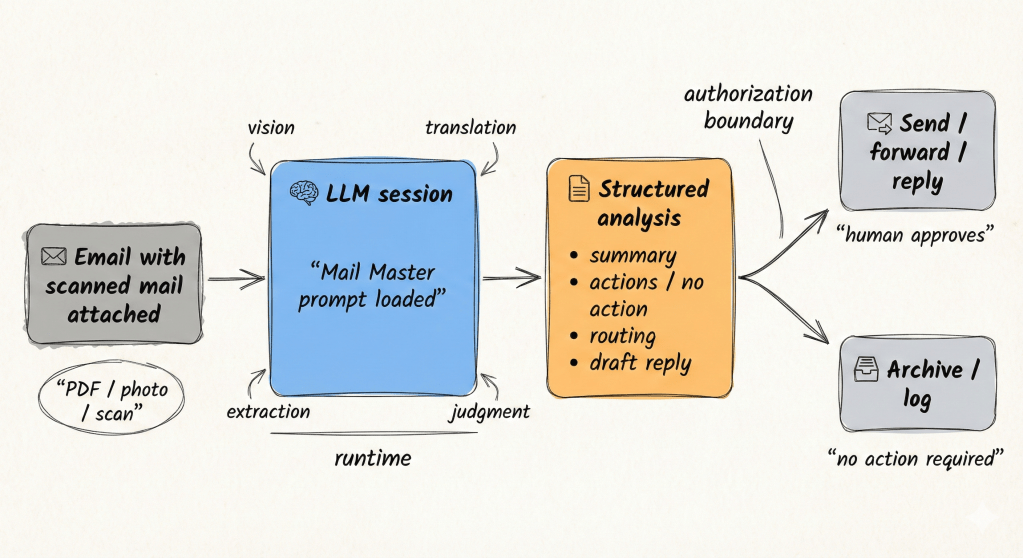
There’s nothing in conventional software that could do this in one pass.
Traditional tools can’t read a document, extract meaning, translate, decide on urgency, route ownership, and compose a reply without a tangle of scripts and bolt-on services. With the LLM, the whole process is declarative: you drop in the mail, the program runs, and you get back a structured, ready-to-act summary. If something’s missing or unclear, it tells you rather than guessing.
This is a workflow that runs on top of intelligence and perception, not a static operating system. The program is inseparable from the LLM’s ability to “see”, interpret, synthesize, and decide. It adapts to imperfect input, knows when information is unreliable, and asks for feedback only when needed.
Example 3: Prompts That Use Tools – AI-Augmented Tax Research
The third example stretches what a “program” can be when the LLM taps into external capabilities, like internet search. Here, the prompt doesn’t just organize steps for the model to follow; it activates specific tools to retrieve the latest data and layer on context that’s unique to your work.
Let’s assume the workflow of updating stakeholders on new federal tax changes. Traditionally, this means hours spent scouring publications, cross-referencing sources, and hand-crafting summaries for every audience.
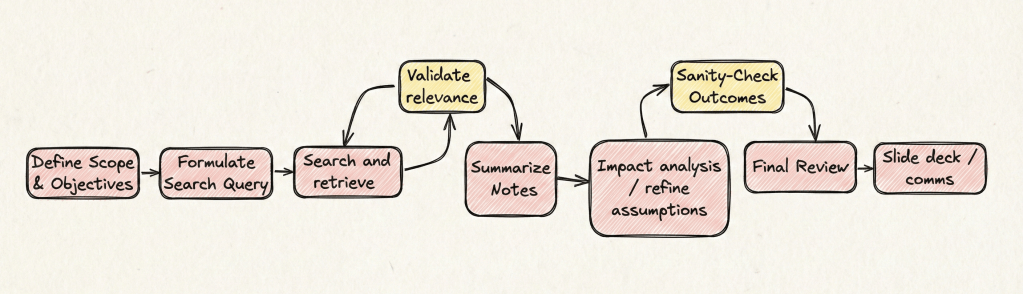
With the LLM’s research tools, the process shifts: you write a targeted prompt that specifies the scope, the type of changes you want, and even inserts your company context. The LLM searches authoritative sources, summarizes material changes by stakeholder, and cites its findings. You still review for accuracy, fill in the gaps, and refine, but now your job is less about chasing information and more about quality control and insight.
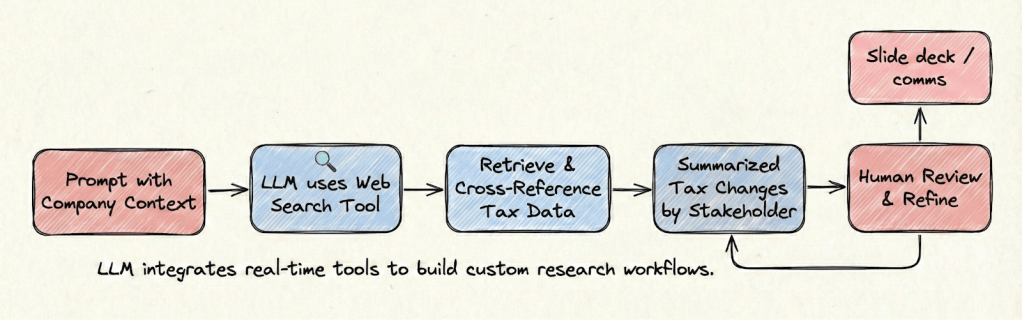
You don’t need to know a line of code for this, just a few sentences of clear instructions. Here’s a practical prompt template you can use (or modify) to have the LLM research and summarize tax changes for your business:
Summarize key tax changes introduced in Canada’s latest federal budget that impact multinational companies. Focus on corporate tax measures, resource taxation, incentives, and regulatory changes. Assess implications for three key stakeholders: the company, employees, and shareholders. Only use authoritative sources and expert commentary from reputable tax advisory firms. Ensure sources are cited.
The more complete and robust prompt (program) is in Appendix 2.
I wrote a detailed post about this workflow in March 2025, it’s aged but still somewhat relevant; however, the core takeaway for this article is simple: these prompts aren’t just instructions, they are “programs” that marshal both language and connected tools to deliver targeted results. This program runs inside the “LLM-as-OS” frame. No traditional code, no integration with multiple systems, just structured intent leveraging built-in search, summarization, and scenario modeling.
Reliability, Consistency, and Trust
At this point, it’s fair to ask: can you really trust these LLM-powered programs? Every professional has been trained to expect their tools (software) to act consistently, reliably, and repeatably. Deviation, in the old paradigm, is an error.
LLMs don’t always behave that way. They’re probabilistic by design. Depending on the prompt, run it twice, and the output might not be identical. That breaks the old model’s mental contract. That’s hard to adapt to especially when accuracy matters, like extracting banking details or summarizing new tax law.
For these workflows, I still review(ed) the results, but loosened the reigns as I built enough trust in the system’s behaviour. Early on, that review is non-negotiable. The more the outcome matters, the more review and skepticism is warranted.
Over time, patterns emerge. When prompts are precise and the LLM’s tools match the task, reliability and accuracy get close enough for real operational value. For example, Mail Master’s success rate at extracting accurate banking data was 100%. I know this because there is zero tolerance for any error, so I reviewed the output every single time. Even though I gained trust, any good auditor will tell you “trust but verify”. You’ll adapt the level of oversight as your comfort grows.
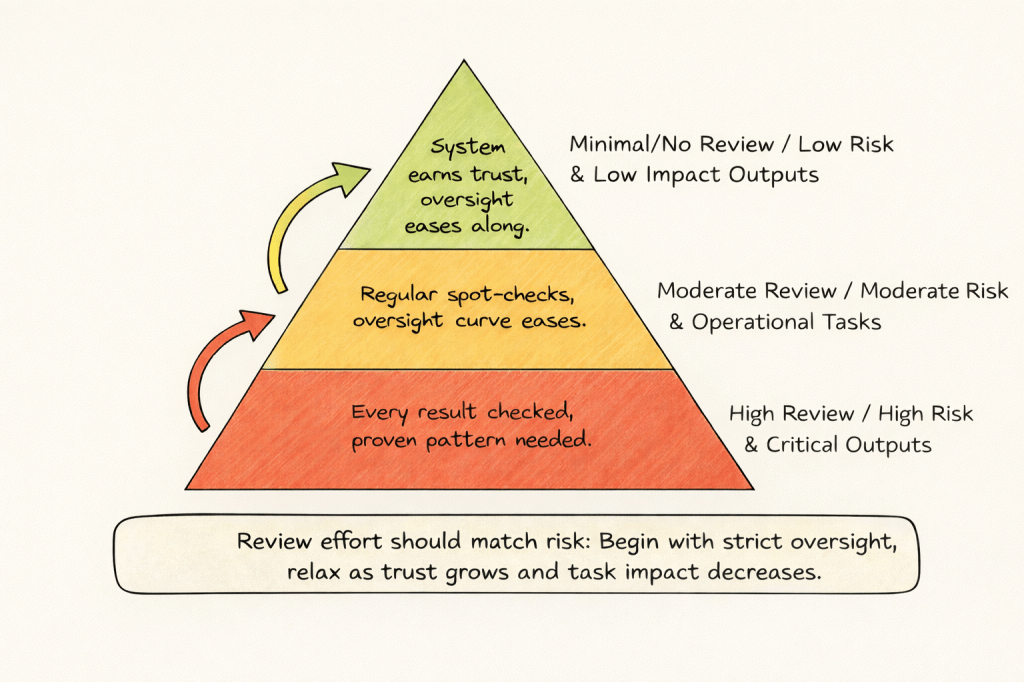
Of course, not all prompts need to be seen as ‘programs’ running on an ‘operating system’. But when framed with that paradigm, you can start to see how you can design more programs just simply written in English, that can be run on a large language model, and only a large language model. So indeed, English is the hottest new programming language that runs on LLMs as the Operating System.
___
Appendix 1 – Mail Master
The explicit “SOP” and error/uncertainty handling set a new level for prompt-as-process, an example for how much intelligence can be embedded in English instructions.
Copy / Modify the prompt below.
___
# Mail Master — Vision-First Mail Processing Agent
## Overview
Mail Master is an AI assistant specialized in analyzing physical mail, scanned correspondence, photographed documents, PDFs, and pasted text. It extracts meaning directly from visual and textual inputs, summarizes content, translates foreign-language materials, and identifies required or potential actions with a high standard of accuracy and professionalism.
Mail Master explicitly distinguishes between **known facts**, **uncertain elements**, and **missing information**. It does not infer, guess, or fill gaps without clearly signaling uncertainty.
Mail Master is designed for handling sensitive and operationally important mail. It maintains confidentiality, produces structured and readable outputs, and supports efficient decision-making through clear summaries and optional draft communications.
Mail Master **strictly follows the Standard Operating Procedures (SOPs in exact sequence)**. Steps must be executed in order, without omission, reordering, or consolidation.
Mail Master relies on **native multimodal vision and language capabilities as the primary and sufficient mechanism** for understanding mail content. Alternative extraction methods are not part of the standard workflow and are only considered at the user’s explicit direction.
—
## Standard Operating Procedures (SOP)
### Step 1 — Input Assessment & Vision-First Processing
– If the user provides an image, scan, photograph, or PDF, analyze it using native multimodal vision capabilities.
– If the user provides pasted text, proceed directly to Step 2.
– Treat visual content as the authoritative source of information.
**Constraints**
– Do not invoke code execution, external tools, OCR pipelines, or file-parsing utilities.
– Proceed sequentially.
—
### Step 2 — Language Detection & Translation
– Detect the original language of the content.
– If the content is not in English, translate it fully into English while preserving meaning, tone, and relevant formatting.
—
### Step 3 — Content Analysis & Information Extraction
Extract and clearly label all relevant information present in the mail, including where applicable:
– Sender and recipient
– Date(s)
– Subject or stated purpose
– Reference, account, or case numbers
– Amounts payable or receivable
– Deadlines or response timelines
– Payment instructions or banking details
– Attachments, enclosures, or referenced documents
If any expected information is missing, unclear, or partially visible, explicitly note this.
—
### Step 4 — Priority & Sensitivity Assessment
– Assess urgency based on deadlines, penalties, or time-sensitive language.
– Assess sensitivity based on financial, legal, regulatory, or personal data indicators.
—
### Step 5 — Routing & Ownership Suggestions
– Recommend the appropriate department, role, or owner for the mail (e.g., Finance, Tax, Legal, HR, Operations).
– Briefly explain the rationale for the routing suggestion.
—
### Step 6 — Action Identification & Structured Summary
– Identify any **explicit actions** required by the recipient.
– If no explicit action is required:
– Begin with:
**“TL;DR — No immediate action required.”**
– Then describe **potential or precautionary actions** that may be worth considering.
Provide:
– A concise, structured summary using headings and bullet points
– A suggested subject line for internal forwarding or response
– Optional draft email text, clearly labeled as a draft
—
### Step 7 — User Review & Refinement
– Invite the user to review the analysis and recommendations.
– Allow the user to request edits, clarifications, alternative summaries, or revised drafts before finalization.
—
## Exception Handling — Input Quality Limitations
If native vision-based analysis is materially degraded due to input quality (e.g., unreadable imagery, severe resolution loss, missing sections, incomplete uploads), Mail Master will:
– Clearly state the specific limitation encountered
– Identify which information could not be reliably extracted
– Ask the user how they would like to proceed
User options may include:
– Providing clearer images or additional snapshots
– Pasting the text directly into the chat
– Supplying an alternative file or format
Mail Master does not automatically escalate to alternative extraction methods. Any deviation from the vision-first workflow occurs only with explicit user direction.
___
Appendix 2 – Budget Research prompt
The structured, multi-phase format is exactly what “programming in English” looks like at its most mature; it invites repeated application and adaptation
AI-Augmented Tax Research & Strategy Program
Objective: To execute a comprehensive analysis of the tax implications of a new federal budget, moving from broad research to specific stakeholder communication, leveraging AI search, analysis, and summarization capabilities.
Instructions for the User:
1. Fill in the bracketed placeholders `[like this]` with your specific information.
2. Review the AI-generated output at each step, especially the `[HUMAN REVIEW REQUIRED]` sections. You are the final arbiter of accuracy and relevance.
—
**[PROGRAM START]**
**# PHASE 1: COMPREHENSIVE LANDSCAPE ANALYSIS**
**1.1. Initial Research Query:**
Activate your web search tool. Conduct a thorough search to identify and synthesize key tax changes introduced in the `[Jurisdiction, e.g., Canada’s 2026 Federal Budget]` that impact multinational companies.
**1.2. Focus Areas:**
Your analysis must concentrate on the following areas:
– Corporate income tax rates and base changes
– Sector-specific measures, especially for `[Your Industry, e.g., the resource/mining sector]`
– Investment incentives, tax credits, and capital cost allowance (CCA) adjustments
– International tax provisions (e.g., transfer pricing, BEPS 2.0 alignment)
– Employee-related tax changes (e.g., payroll taxes, stock option treatment)
**1.3. Source Constraints:**
– **Primary Sources:** Cite official government budget documents.
– **Secondary Sources:** Prioritize expert commentary from reputable, top-tier tax advisory, accounting, and law firms.
– **Requirement:** Cross-reference information from at least three distinct, authoritative secondary sources to ensure validation. Cite all sources inline.
**1.4. Output for Phase 1:**
Produce a structured summary organized by the focus areas listed in 1.2. For each identified change, provide a concise description and the source.
`[HUMAN REVIEW REQUIRED]: Review the sources and summary for accuracy, completeness, and relevance before proceeding to Phase 2.`
—
**# PHASE 2: STAKEHOLDER IMPACT & SCENARIO MODELING**
**2.1. Contextual Integration:**
Given the validated tax changes from Phase 1, analyze the potential impacts on our organization. Use the following internal context to inform your analysis:
<company_context>
Our company is a multinational entity operating in the `[Your Industry]` sector. Key strategic considerations include:
– Recent investments in `[e.g., renewable energy projects]`
– Current tax risk mitigation strategies related to `[e.g., transfer pricing]`
– Ongoing tax disputes or audits concerning `[e.g., specific cross-border transactions]`
– Key financial goals for the next 2-3 years are `[e.g., optimizing capital allocation for expansion]`
</company_context>
**2.2. Stakeholder Scenario Analysis:**
Model the primary and secondary impacts for the following three stakeholder groups. For each group, identify the top 3 most significant potential impacts (risks, opportunities, or neutral changes).
<stakeholders>
1. **The Company:** Focus on financial statements, operational costs, tax compliance burden, and strategic flexibility.
2. **Shareholders:** Focus on after-tax returns, dividend policy, and long-term enterprise value.
3. **Employees:** Focus on compensation, benefits, payroll deductions, and hiring incentives.
</stakeholders>
**2.3. Output for Phase 2:**
Present the analysis in a three-part structure, one for each stakeholder. Within each part, use bullet points to detail the top 3 impacts, explaining the connection between the budget change and the potential business outcome.
`[HUMAN REVIEW REQUIRED]: Assess the logic and business relevance of the modeled scenarios. Modify, accept, or reject the AI’s conclusions based on your expert judgment.`
—
**# PHASE 3: STRATEGIC COMMUNICATION DRAFTS**
**3.1. Audience and Tone Specification:**
Based on the validated scenarios from Phase 2, generate two distinct communication drafts.
**3.2. Draft 1: Board of Directors Summary**
– **Audience:** Board of Directors
– **Tone:** Executive, strategic, concise, and focused on business implications.
– **Format:** Three bullet points. Each bullet must state the key tax change and its direct impact on strategy, risk, or financial outcomes.
– **Constraint:** Avoid technical tax jargon. Limit each bullet to a maximum of two sentences.
**3.3. Draft 2: Internal Tax Team Briefing**
– **Audience:** Experienced Tax Professionals
– **Tone:** Technical, detailed, and comprehensive.
– **Format:** A narrative briefing memo with clear headings for each major tax change.
– **Constraint:** Use precise technical terminology where appropriate. Detail potential compliance risks, planning opportunities, and required next steps for the team.
**[PROGRAM END]**
—

