

On this page
A tax workflow case study in code, AI, and verification
This case study examines a real production tax workflow performed for a Canadian public practice firm in a firm-permitted Claude Code environment. The workflow is bespoke to one of the firm’s business lines: it involves recreating a 3rd-party prepared tax return by moving SR&ED claim information through workpapers and into tax-preparation software.
That specificity does not negate the general lessons from this particular workflow. It argues that bespoke, compliance-heavy professional workflows can be decomposed into agents, rules-based code, structured artifacts, verification gates, and human judgment checkpoints. The workflow is specific to this firm. The automation pattern is broader.
How to read this report
This report is built to be read as an interactive artifact. A tax leader, process owner, or practitioner can read it straight through, or drop the file into an AI assistant and interrogate its claims against their own workflow. If you are reading with an AI, paste this prompt first:
You are helping me evaluate a case study about agentic automation in
professional tax workflows. Read for five things:

1. what parts of the workflow were handled by agents,
2. what parts were moved into rules-based code,
3. what verification gates controlled risk,
4. what human judgment points remained,
5. what lessons transfer to other tax or finance workflows even though the
   SR&ED workflow itself is bespoke to one firm's business line.

Summarize the strongest evidence, list the main caveats, identify which claims
are supported by measurements, and suggest which parts of this pattern could
apply to my own tax workflow.
The useful question is whether your own workflows share this one’s shape: repeated source documents, structured outputs, review burden, software-system interaction, Excel workbooks, and a tie-out across multiple sources. Your team almost certainly has similarly shaped workflows.
Executive Summary
The production architecture for this kind of work is an engineered workflow: AI orchestration, durable code, verification gates, and human judgment, combined. It produces reliable, reviewable work while reducing professional effort. This case study supports that recommendation with a measured engagement rather than a demo.
Tax professionals are short of attention relative to the volume, complexity, and review burden of modern tax work. New legislation, expanding reporting requirements, more data sources, and more machine-generated correspondence all add to the load. So the practical question is less “Can AI do this task?” and more “Where should the work live so that professional attention is spent on judgment instead of preparation?”
This study is based on re-engineering a Canadian public-practice firm’s SR&ED workflow. To measure results, it was run three ways: by an experienced person, by an engineered workflow, and by a pure agent. All three reach the same deliverable, a completed preparation package handed to the reviewer. The workflow touches source documents, workpapers, TaxPrep imports, deduction sizing, and final review. What differs is how much of the professional’s effort each approach consumes, and how review-clean the resulting workpaper is.
The experienced-person baseline establishes the real burden: 1:07:24 on the clock and 38:52 of active human input, 869 clicks, 2,104 keystrokes, and 322 application changes spent manually entering and reconciling the browser return against the PDF sources. That is the work the other two approaches have to move somewhere, so attention is freed.
The engineered workflow is the one to adopt. It completes the same deliverable for a fraction of the professional’s effort: in a measured run, about 1:12 of active human input, roughly a 97 percent reduction, and it was the fastest of the three on the clock. Code runs the repeatable work in seconds; gates decide whether the work may move forward; and the professional’s involvement narrows to two defined touchpoints, a credential login, and one approval of a recommended SR&ED deduction amount. The professional reviews a recommendation instead of driving the preparation.
Those gates create trust by validating the work before handoff and catching errors while they are still cheap to fix. In one run, a gate held the pipeline on a $13,611 refundable-ITC under-computation until it was corrected, a gate that stops a wrong number is doing its job. Across successive engineered runs the workflow matured: interventions got cleaner, and each defect found was converted into a permanent check.
The pure agent proved something important. Given a strong operating prompt, critical reference artifacts, and a few human touchpoints, it performed the same substantial workflow with just 2:44 of active human input. Two things keep it from being the production architecture. First, that 2:44 understates its true cost to the professional. The agent stalled mid-workflow on steps it could not clear, including a security boundary and a point where it did not know how to proceed, and returned to the person for direction. Each return is an unpredictable interruption: the professional has to drop their own work, reorient where the agent is, and push it forward. You could not send it off and leave it. Second, although its core tax numbers tied out, a 97.2 core score on the tax-determinant values, its supporting workbook did not fully reconcile, a 92.9 complete-workpaper score. With no gate to catch that gap, the defect reached the reviewer’s workpaper.
That is the core lesson. In tax work, getting 80 to 90 percent of the way there can leave the reviewer with the hardest part. A professional does not need a plausible workpaper; they need one that ties. That creates a last-mile problem that belongs in durable code and proper review and verification gates.
The result is a bounded workflow, attended at two defined points, with the preparation burden moved off the professional’s desk and into engineered systems. The professional moves from preparer to reviewer.
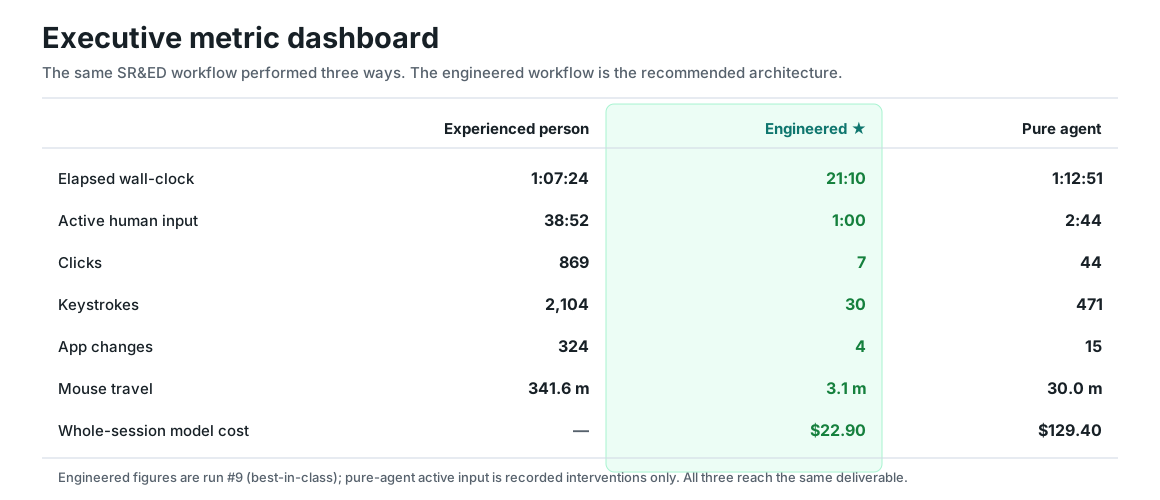
At a glance
Three ways of performing the same workflow, an experienced person, the engineered workflow (agents, code, gates, and human judgment), and a pure agent, measured on the same engagement. Interaction load below means the clicking, typing, app-switching, and mouse movement the professional performs; it is a proxy for attention burden.
| Measure | Experienced person | Engineered workflow (recommended) | Pure agent |
|---|---|---|---|
| Elapsed wall-clock | 1:07:24 | 21:10 | 1:12:51 |
| Active human input | 38:52 | 1:00 | 2:44* |
| Clicks | 869 | 7 | 44 |
| Keystrokes | 2,104 | 30 | 471 |
| App changes | 324 | 4 | 15 |
| Mouse travel | 341.6 m | 3.1 m | 30.0 m |
| Whole-session model cost | – | $22.90 | $129.40 |
- The pure agent’s 2:44 understates its burden. It counts only the operator’s recorded interventions, not the time spent monitoring the run to catch each unexpected call for help, and not the cost of breaking focus to orient, decide, and act before returning to other work. Its true attention cost is higher than the number shows.
The pure-agent wall-clock is its operator-present window (a multi-hour idle pause is excluded). The two model costs are whole-session totals, each slightly overstated and measured the same way, so they are directly comparable.
Three things the numbers alone do not capture:
- All three reach the same deliverable, a completed SR&ED preparation package handed to the reviewer; the engineered run’s claim landed in the live return, PDF-verified. The differences are effort and review-cleanliness, not whether the work finished.
- The character of the human’s involvement differs. The engineered workflow’s minute was two bounded touches: a login and one approval of a recommended deduction. The pure agent’s 2:44 was unbounded, it stalled mid-run and had to be rescued. Close on the stopwatch, opposite in experience.
- Workpaper review-cleanliness differs. The pure agent’s core tax numbers tied out (a 97.2 core score) but its supporting workbook did not fully reconcile (a 92.9 complete-workpaper score), and with no gate that gap reached the reviewer. The engineered workflow scored 97.5 / 97.0, a dead heat on the tax math, but its workpaper ties, so its gates and review caught its defects before hand-off.
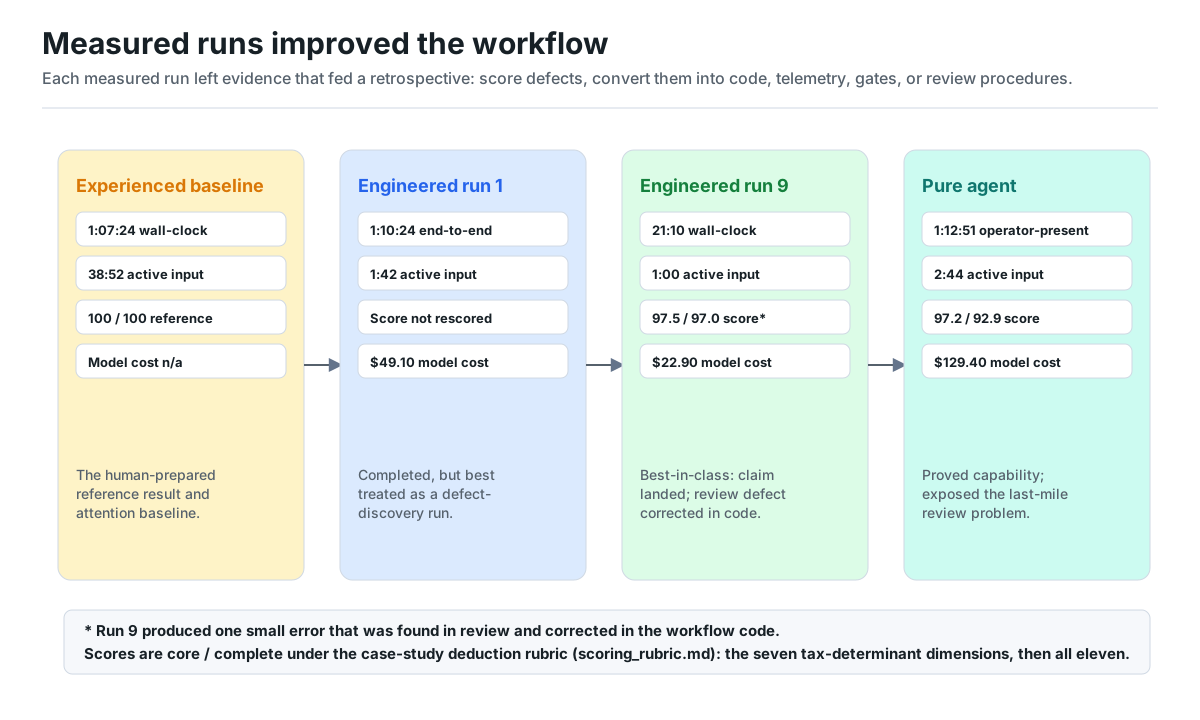
Read together: the person and the pure agent took about the same time on the calendar, while the engineered workflow was roughly three times faster; the professional’s hands-on effort fell about 99 percent under the engineered workflow; and because all three reach the same deliverable, the real differences are effort and review-cleanliness.
These figures come from one engagement and one operator. They are case-study evidence, not universal tax-industry averages.
The three clocks
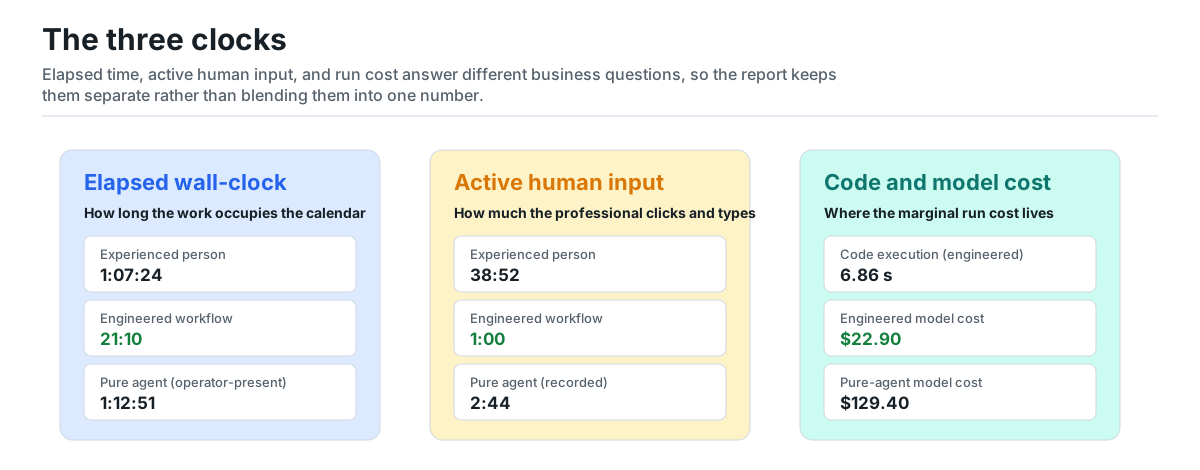
Automation claims often collapse different kinds of time into one number. This case study keeps three clocks separate.
| Clock | What it measures | Why it matters |
|---|---|---|
| Elapsed wall-clock | The time from start to finish of the working session | This is what a client or manager experiences as turnaround |
| Active human input | Input ticks containing clicks or keystrokes | This is the direct hands-on burden moved out of the professional’s day |
| Code execution and model cost | How long the code took to run, and what the AI model cost | This shows whether the bottleneck is code, AI inference, vendor-system interaction, or review |
On the calendar, the pure-agent run took about as long as the experienced person did: its operator-present window was in the same ballpark as the baseline. But the time was spent very differently. The experienced person was working the whole time. During the pure-agent run, the professional mostly supervised, reading the agent’s output, approving decisions, and stepping in where platform security required a human.
That difference matters more than the minutes, and it is easy to miss. Active human input alone does not capture the kind of demand each approach places on the person. The pure agent’s interruptions were unbounded: it stalled mid-workflow on steps it could not clear and came back for direction, so the professional had to drop their own work, rebuild context, and push the run forward. The engineered workflow’s interruptions were bounded: a credential login, and one approval of a recommended deduction. The next section returns to this contrast; it is the part the minute-counts hide.
What this case study can claim
The measured evidence supports a focused set of positive claims.
-
A bespoke line-of-business tax workflow can be decomposed into source documents, structured artifacts, code, verification gates, agent orchestration, and human review, and sped up through intelligent automation.
-
A pure agent can perform a substantial real tax workflow when it is given a sophisticated operating prompt, critical reference artifacts, and human touchpoints. In this case it produced a correct tax-determinant path with very low active human input.
-
Production reliability comes from code and gates around the agent, not the agent alone. The same run that proved capability also showed the last-mile problem: the tax-determinant path tied out, but a supporting workbook did not fully reconcile, increasing review difficulty.
-
Code is the throughput layer for repeatable work, parsing, extraction, transformations, upload construction, workbook population, and tie-outs belong in code when a workflow needs to become reliable and repeatable.
-
Verification gates are the trust layer. A workflow should be judged by the defects it prevents, the review burden it reduces, and the trust it creates for the reviewer. A strong gate gives the reviewer a strong starting point when the work is handed off.
-
The professional moves from preparer to reviewer. The work does not disappear; the highest-value attention moves to judgment, exception handling, and final review.
Why this case study is broadly relevant
The workflow in this case study is bespoke to one of the firm’s business lines. It involves source documents, SR&ED claim information, workpapers, tax-preparation upload files, a live TaxPrep/iFirm environment, deduction sizing, verification gates, and final professional review.
That specificity can make the case look narrow at first glance. The case matters precisely because the workflow is awkward, multi-surface, judgment-sensitive, and firm-specific, exactly the kinds of workflow that generic software rarely fits cleanly. The specificity is the source of the relevance.
The automation pattern is broader than the workflow:
| This case-study workflow | Transferable pattern |
|---|---|
| PDF, DOCX, and CSV source documents | Variable source and extraction surfaces need extraction and evidence |
| SR&ED workpapers and tax-preparation upload files | Repeatable transformations should become code |
| TaxPrep/iFirm browser interaction | Vendor-system interaction needs an integration layer |
| Deduction sizing | Judgment points should be explicit human checkpoints |
| Gate 1 and Gate 2 | Correctness needs independent verification |
| Final professional review | The expert remains accountable for review and signoff |
The key design move is to stop asking the machine to mimic the human checklist step by step. A human workflow is often serial because a person has one high-bandwidth channel of attention. A machine-native workflow can split independent extraction and analysis, let parallel processes interleave, write structured artifacts, run rule-based checks, and keep everything that touches the online tax software on a single controlled path, because that software holds state and can only be driven one step at a time.
In this case, the pure-agent run showed what a capable agent can do when given a sophisticated operating prompt and critical reference artifacts. The engineered workflow showed the more durable production shape: parent-agent orchestration, specialist sub-agents, rules-based scripts, structured artifacts, verification gates, and human checkpoints.
That distinction matters for tax departments. The practical opportunity is not to throw AI at a process and hope it completes. The opportunity is to use AI to help build systems where repeatable work becomes code, ambiguous work is routed to agents, verification is explicit, and professional attention is reserved for the points where judgment matters.
The volume problem is an attention problem
Tax work keeps accumulating volume. New reporting requirements, new entity structures, new information sources, new correspondence, and more automated administration all create more material for professionals to read, classify, reconcile, and respond to. Generative AI adds another pressure: it makes it easier for every party in the system to create more text, more requests, more summaries, and more documents.
Most tax work still happens in Excel, and the tax-specific software many teams do have is often narrow in scope. The practical problem is that the professional still has to move information across too many surfaces, keep too many facts in working memory, and re-check too many values by hand.
That is why this case study measures more than time saved. It measures the workload that sits behind the time:
- how long the workflow took on the clock;
- how much direct input the professional had to provide;
- how often the professional switched between applications;
- how many clicks and keystrokes were required;
- how much review and upload backtracking occurred;
- whether the result tied out when the system said it was complete.
The goal of automation is to move preparation burden into code and structured systems so the professional can spend their attention on judgment, exceptions, and review, not merely to make a stopwatch number smaller.
The experienced-person baseline
Before judging the agentic workflows, the workflow needed a baseline: how long does an experienced person take to perform this work directly?
The experienced-person baseline took 1:07:24 of wall-clock time, trimmed from first click to completion. Of that, 38:52 was active human input: the time where the professional was actually clicking, typing, navigating, or otherwise driving the work.
The elapsed time tells a manager how long the workflow occupied the calendar. The active-input time tells the professional how much of their attention and motor effort the workflow consumed.
| Baseline measure | Experienced-person result | Business meaning |
|---|---|---|
| Wall-clock time | 1:07:24 | The workflow consumed over an hour elapsed |
| Active human input | 38:52 | About 39 minutes of direct hands-on work |
| Clicks | 869 | Significant manual navigation and selection |
| Keystrokes | 2,104 | Significant manual entry and search work |
| Application changes | 324 | High context-switching burden |
| Distinct work surfaces | 7 | Multi-surface workflow |
| Mouse travel | 341.6 m | Physical proxy for interaction load |
The workflow also showed a large amount of review and upload backtracking. In the telemetry study, the experienced-person run revisited the upload surface 99 times and the review surface 97 times, with 160 crossings between review and upload. Those crossings are the signature of structurally fragmented work: the information needed to complete the task does not fit naturally in one screen, one system, or one mental frame, so the professional shuttles between them. They reflect the structure of the task, not the skill of the operator.
That fragmentation is exactly what good automation should remove. The goal is to remove the need for that low-value movement altogether, not to make the professional click through it faster.
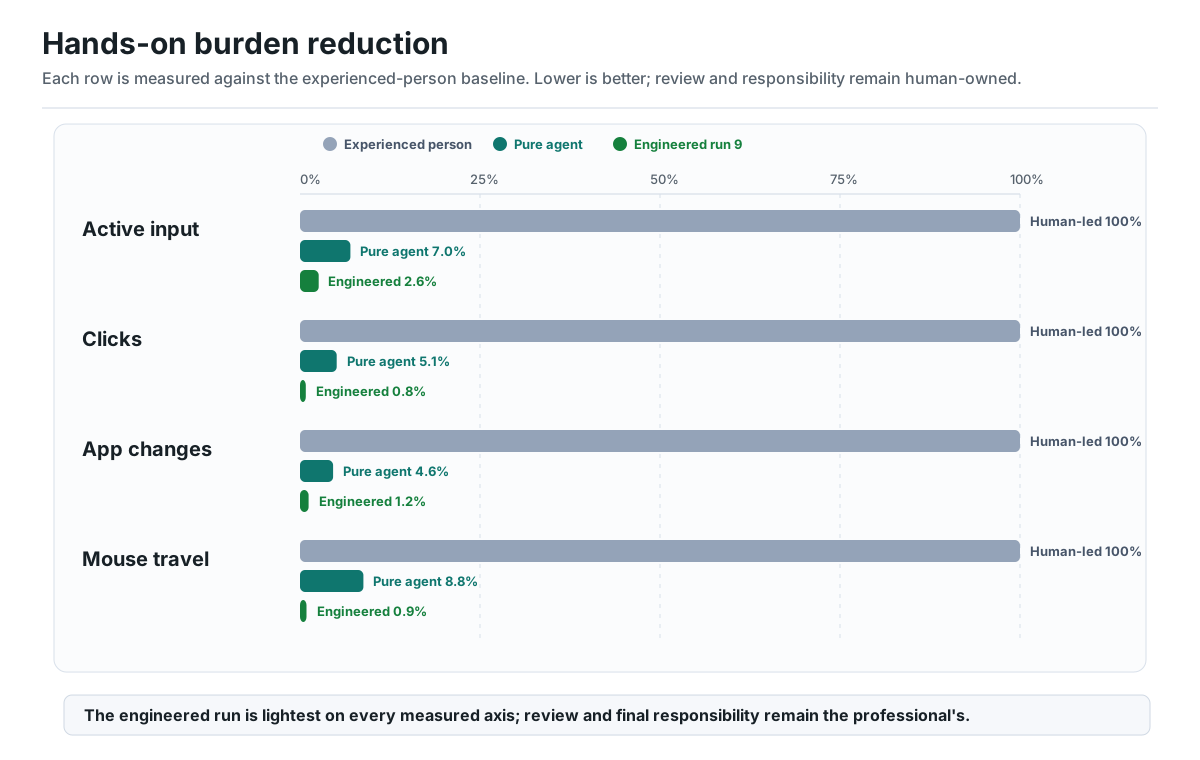
How the runs improved
The runs should not be read as one simple race between a human and an agent. They show a progression in workflow design.
The experienced-person baseline shows what the workflow costs when a professional performs it directly. The engineered runs show what changes when repeatable work is moved into code and the agent orchestrates bounded stages. The pure-agent run shows how far a capable agent can go when it performs the workflow itself from a sophisticated prompt and critical reference artifacts.
The three engineered runs show the improvement directly. These figures are the operator’s involvement during the run; professional review is separate and ongoing.
| Engineered run | Wall-clock | Active input | Clicks | Keystrokes | App changes | Model cost | What it taught |
|---|---|---|---|---|---|---|---|
| Run 1, first instrumented | 1:10:24 | 1:42 | 22 | 286 | 11 | $49.10 | Work moved from doing to checking; early recovery loops remained |
| Run 5, matured | 40:36 | 1:12 | 17 | 204 | 8 | $37.58 | Gate 2 caught a real $13,611 ITC under-computation and held, the gate doing its job |
| Run 9, current best | 21:10 | 1:00 | 7 | 30 | 4 | $22.90 | Claim landed in the live return (PDF-verified); a stale export from the vendor system caused a false gate failure, since mitigated |
| Average | not averaged | 1:18 | 15 | 170 | 8 | not averaged | Earlier runs predate the code optimization, so wall-clock and cost are shown best-in-class, not averaged |
Every burden metric fell across the engineered runs, and model cost fell from $49.10 in the first instrumented run to $22.90 in run 9. For comparison, the experienced-person baseline took 1:07:24 and 38:52 of active input, and the pure agent took 2:44 of recorded input at a model cost of $129.40; both are detailed in the at-a-glance above.
Each measured run left evidence that was used to create a retrospective. The retrospective turned failures into prompt rules, code, telemetry, workflow gates, or review procedures. That is how the system matured.
How the output is scored. The core and complete scores come from a defined method,
not a holistic impression. Each of eleven dimensions starts at 100 and loses points only
for named, evidenced defects, sized by the downstream safety net under each: a workpaper
that does not tie is penalized far harder than a checkbox a vendor diagnostic flags. The
core score aggregates the seven tax-determinant dimensions; the complete score adds
the workpaper, process, and code-reusability dimensions. Every point traces to a specific
defect, so the scores are reconstructable rather than asserted, a reviewer can disagree
with a single deduction instead of arguing with a number that has no derivation. The full
method, with the severity tiers and a worked example, is in scoring_rubric.md. These are
an internal case-study rubric, not an external audit opinion.
This is also why “agentic automation” is better understood as workflow engineering than as prompting. A prompt can start an agent-led run. It cannot by itself create a production workflow. Production maturity comes from what happens after the run: scoring the output, identifying defects, moving repeatable work into code, and adding gates so the same defect does not recur.
What the pure-agent workflow proved
The pure-agent workflow matters because of its scope. A single agent performed a substantial real tax workflow from a sophisticated operating prompt and a defined set of reference artifacts. It parsed source materials, built working files, generated tax-preparation upload files, drove the available web interface, asked for defined human judgment at the right points, and produced a tax-determinant path that tied out.
That is a meaningful capability claim. It shows that current agents can do far more than draft memos or summarize documents. When the workflow is described with enough specificity, and when the agent has the artifacts no model could invent on its own, a pure agent can perform professional workflow steps across documents, code, workpapers, and a live application.
The same run also shows why a pure-agent workflow should not be confused with a production architecture.
| What the pure agent proved | Why it matters | Production lesson |
|---|---|---|
| It could perform the workflow from a structured operating prompt | The agent was not merely answering questions; it was executing a multi-stage professional workflow | Serious agent runs require workflow design, not casual prompting |
| It produced a tax-determinant path that tied out | The core tax-determinant path was correct under the case-study scorecard | Correct return values are necessary, but not sufficient for a complete deliverable |
| It reduced active human input to 2:44 | Preparation burden moved out of the professional’s hands | Low input time should be paired with review and tie-out evidence, not marketed as “no human work” |
| It used critical reference artifacts | Some workflow assets, such as cell maps, taxonomies, and templates, are prerequisites no agent can invent during the run | Automation depends on durable artifacts as much as model capability |
| It wrote and ran code as it worked | The agent discovered executable logic that can inform later engineering | The value of the run increases when the useful logic is scored, harvested, refined, and made reusable |
| It encountered a file-upload security limit | The blocker was a platform and integration limit, not a reasoning failure | Vendor-system integration needs engineered channels, and where available, APIs should beat UI automation |
| It left supporting-workpaper defects | The tax-determinant path tied out, but the supporting workbook did not fully reconcile to it | The last mile is tie-out quality; verification must cover the complete deliverable, not only the prepared return |
| It executed serially | The run resembled a human sequence more than a machine-native workflow | Production workflows should use an engineered architecture where independent work can fan out and the live application spine stays controlled |
The hardest part to communicate is the difference between “the prepared return was right” and “the deliverable was production-clean.” In this case, the tax-determinant path was correct. The supporting workbook, however, carried stale values that made the workpaper harder to review. Those defects did not change the prepared return, but they did matter professionally because reviewers do not review only the result. They review the path to the result.
That is why a pure-agent workflow can be both impressive and incomplete. It can show that the work is possible, reveal the shape of the workflow, produce useful code, and identify where gates belong. But if the last mile is not coded and verified, the reviewer inherits a more subtle problem: not “nothing was done,” but “most of it was done and now I have to find the part that does not tie.”
For a tax professional, that is the real review burden. The useful automation is the one that makes the reviewer confident, not the one that makes the agent look autonomous.
Why 80-90 percent complete can be harder to review
Review work requires traceable artifacts. Tax work may be reviewed in financial statement audits, tax authority audits, SOX testing, and other control frameworks where companies must demonstrate that review and sign-off actually occurred. A return value that ties out is only one layer of the question. The reviewer also needs to know whether the workpapers, source documents, upload files, and review notes all tell the same story.
That is why the last 10-20 percent of completion matters so much. A blank file is obviously unfinished. A visibly incomplete file is inconvenient, but the reviewer can see where the gaps are. An almost complete file with hidden reconciliation defects is different. It can require a reviewer to re-open the whole path because the problem is no longer “what still needs doing?” The problem becomes “which part of this apparently completed work cannot be trusted?”
The pure-agent workflow makes this point concrete. The tax-determinant path tied out and scored strongly under the case-study scorecard. But the complete deliverable score was lower because the supporting workbook did not fully reconcile to the prepared return. The defect did not mean the return path failed. It meant the review file was harder to rely on than the prepared return alone.
In a commercial or live environment, an automation that only gets the team to an 80-90 percent complete deliverable can give back its preparation savings as review effort. The professional has been moved from preparer to reviewer, which is the right direction, but the review role still needs clean evidence. Otherwise, the professional has to spend judgment-time on mechanical reconciliation.
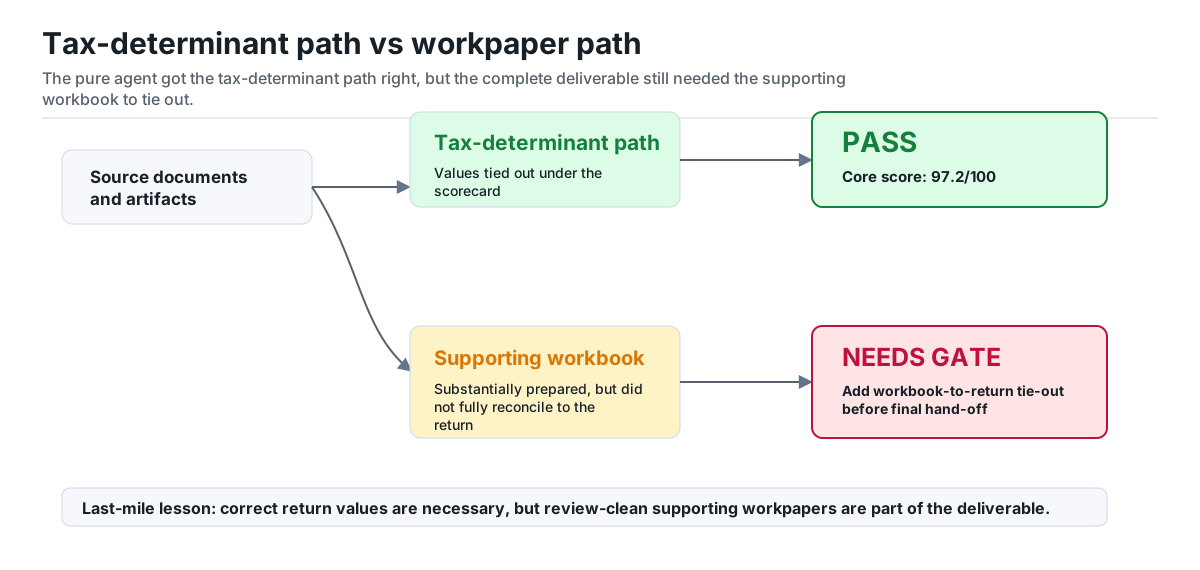
| Review layer | What the run showed | What the reviewer still needs | Production gate |
|---|---|---|---|
| Tax-determinant path | The tax-determinant values tied out under the scorecard | Evidence that the tax-determinant values came from the current support path | Return-to-workpaper tie-out before hand-off |
| Supporting workbook | The workbook was substantially prepared but did not fully reconcile to the prepared return | A clean workbook that supports the prepared return without stale values or unexplained differences | Workbook rebuild or workbook-to-return reconciliation check |
| Upload files | The agent could generate files used to move values into tax-preparation software | Schema, field-map, and balance checks before values touch the return | Pre-upload validation and post-upload comparison |
| Agent notes and generated code | The run produced useful reasoning traces and executable logic | Separation between useful discovery work and reusable production logic | Harvest useful logic, then harden it into maintained code |
| Human judgment points | The agent knew where to ask for professional approval | Clear checkpoints where the professional decides rather than re-performs | Structured human-in-the-loop approval gates |
This is the reason the case study should not be read as a contest between human work and AI work. The better comparison is between unsupported automation and reviewable automation. A workflow that saves preparation time but leaves the reviewer to manually hunt for mechanical defects is not mature enough. It may still be valuable as a prototype, a discovery run, or a way to learn the shape of the workflow. But it is not yet the production answer.
The production answer is to move the mechanical last mile into code. Code can recalculate, compare, scan for stale defaults, enforce field maps, validate upload files, and refuse to hand the work forward when a reconciliation fails. The reviewer should spend attention on the professional questions: whether the claim position is appropriate, whether the support is sufficient, and whether the recommended deduction reflects the engagement facts. The reviewer should not be spending that attention discovering that a supporting workbook no longer ties to the prepared return.
This is the strongest practical lesson from the pure-agent workflow. The agent showed that the work can be done. The scoring showed where the work was not yet review-clean. The next engineering step is to convert the repeatable parts of the review problem into coded gates, not simply to write a longer prompt.
Code as the throughput layer
Code does not reduce the volume of tax work. It increases the rate at which a team can move through volume while preserving professional judgment.
That distinction is central to the case study. The practical answer is to identify the parts of the existing workflow that are repeated, structured, and checkable, then write code around those parts, rather than replacing the professional with an agent or buying another module and hoping it matches the work.
In this workflow, the speed-up did not come from asking the model to think through every cell, every document, and every upload step from first principles. The speed-up came from moving the right work into executable procedures: parsing PDF, DOCX, and CSV source documents, extracting structured data, normalizing values, populating workbooks, generating upload files, footing balances, capturing evidence, and refusing to advance when a gate failed.
The model still matters. The agent can read messy context, decide which branch of the workflow applies, call tools, recover from exceptions, draft notes, recommend a professional decision, and orchestrate the sequence. But once a step can be expressed as a rule, a parser, a field map, a validation check, or a repeatable transformation, code is the better execution layer.
| Work component | Better owner | Why |
|---|---|---|
| Source package intake | Agent plus code | The agent can orient to the engagement package; code can classify files, parse known formats, and create structured artifacts |
| PDF, DOCX, and CSV extraction | Code, with agent escalation for exceptions | Extraction needs repeatability, traceability, and error reporting more than conversational reasoning |
| Data normalization and transformation | Code | Type checks, reconciliations, and consistent naming make later review easier |
| Workbook population | Code | Field maps, formulas, static inputs, and stale-template checks need repeatable execution |
| Upload file generation | Code | CSV and workbook outputs should be generated from validated source artifacts, not copied by hand |
| Vendor web interface steps | Controlled automation, with human checkpoints where needed | Web UI automation is useful but brittle; credentials, file selection, and security boundaries need explicit controls |
| Claim-size recommendation | Agent plus professional judgment | The system can prepare the recommendation, but the professional decides the position |
| Mechanical tie-outs | Code | The reviewer should not be the first gate to discover that support does not reconcile |
| Final review | Professional | Judgment, sufficiency of support, engagement risk, and final sign-off remain professional work |
This is why the case study separates elapsed time, active human input, code execution, and model cost. They answer different business questions. Elapsed time tells the team how long the work occupies the calendar. Active human input tells the professional how much direct clicking, typing, and app-switching was moved out of their day. Code execution and model cost show where the marginal cost of another run actually lives.
In the measured engineered workflow, the code itself took 6.86 seconds to execute. That does not mean the whole workflow took seconds. It means the arithmetic, parsing, file generation, and checks were not the bottleneck. The slower and more expensive surfaces were orchestration, model inference, vendor-system interaction, and verification.
| Measurement | Public interpretation | Caveat |
|---|---|---|
| 6.86 seconds of measured code execution in an engineered run | Repeatable code was not the bottleneck once the process was engineered | The deterministic core runs in seconds; figure from an instrumented engineered run |
| 22.90 USD whole-session model cost for the engineered run | Even counted across the whole session, the coded workflow’s model cost stays modest | Whole-session total; slightly overstated because it includes a post-gate diagnostic turn |
| 129.40 USD whole-session model cost for the pure-agent workflow | A pure-agent run can complete substantial work, but its model-cost surface is larger | Whole-session total, slightly overstated; same scope as the engineered figure, so the two are directly comparable |
| 54 percent fewer tokens and 38 percent fewer assistant turns than the prior pure-agent run | Prompt refinement and fewer rescue loops reduced the inference workload | A like-for-like pure-agent comparison, not proof that all agent runs automatically get cheaper |
The unit economics make the design choice visible. For this analysis, the model pricing basis was 15 USD per million input tokens, 75 USD per million output tokens, 1.50 USD per million cache-read tokens, and 18.75 USD per million cache-write tokens. Those are analysis assumptions, not a universal or current price quote. If the report quotes current prices at publication time, those prices should be verified then.
What matters is the shape of the spend, not the exact price schedule: a model pays for context, tool results, screenshots, recovery loops, and repeated reading. Code does not do that. Code has a development cost and a maintenance cost, but once a repeatable operation has been captured, each run can execute quickly and consistently.
That is why “code as the throughput layer” is the central operating lesson. In a tax department or public practice firm, volume will continue to arrive: documents, reporting requirements, data pulls, reconciliations, notices, requests, review comments, and system hand-offs. Agents can help decide what to do. They can explore ambiguity. They can assist with judgment-heavy moments. But code is what lets the team move faster through the structured work without making the reviewer pay for every shortcut later.
The sharper production question is which parts should still be done by an agent once we understand the task. The pure-agent workflow already showed it can do a great deal; the design question is where the agent still earns its place. For this workflow, the answer is clear: keep the agent where context, orchestration, exception handling, and recommendation matter; move repeatable preparation and verification into code.
The engineered architecture
The production architecture is a machine-native workflow: parallel where work is independent, serial where a stateful system requires it, gated where correctness matters, and human-led where professional judgment belongs, not simply a faster version of the human checklist.
That architecture matters because a simple serial automation inherits too much from the manual workflow. A person naturally works through the engagement in a sequence: open the source package, read the documents, prepare the workpaper, move values into tax-preparation software, review the result, and clean up the file. A single agent tends to do the same thing unless the workflow forces a different shape. It may be faster at some steps and much less demanding of the operator, but it still carries the same basic sequence.
The engineered design changes the shape of the work. It lets independent document and data tasks fan out, then brings the outputs back into structured artifacts that code can validate and use. It keeps the live vendor-system path controlled because the tax-preparation session is stateful: one login, one return file, one sequence of imports, exports, and tie-outs. It places human approval at the judgment points rather than asking the professional to babysit preparation.
The result is a layered system, not a contest of agent versus code.
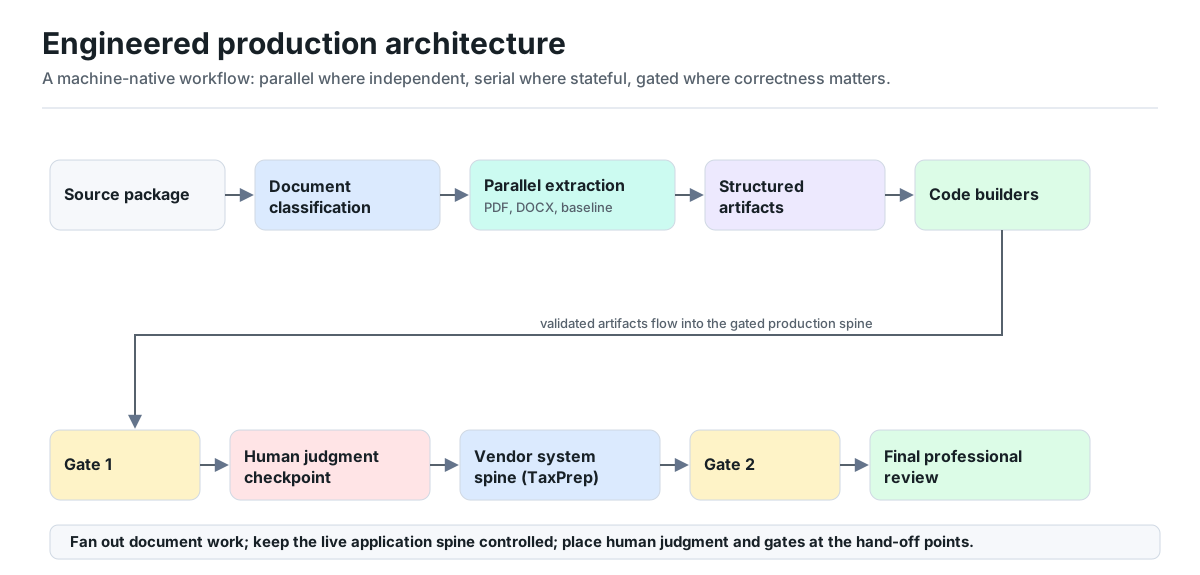
| Layer | Role in the workflow | Why it belongs there |
|---|---|---|
| Parent agent | Orchestrates the engagement, selects stages, calls tools, tracks state, and handles exceptions | The workflow needs a coordinator that can read context and adapt without losing the run plan |
| Specialist sub-agents | Work on bounded extraction, classification, or review tasks where parallel work is possible | Independent document work should not wait in a human-like serial queue |
| Structured artifacts | Hold extracted facts, source references, field maps, and stage outputs | Later stages need durable inputs, not conversational memory |
| Rules-based code | Parses documents, builds workpapers, generates upload files, performs calculations, and runs checks | Repeatable work should execute consistently and quickly |
| Verification gates | Stop the workflow when required reconciliations do not pass | A held gate is a success when it prevents a bad hand-off |
| Vendor interface automation | Moves validated values through the available tax-preparation and firm systems | UI automation is a bridge when a supported API is not being used |
| Human checkpoints | Approve judgment calls, credentials, security-bound steps, and final review | Professional responsibility should remain where judgment and sign-off matter |
The pure-agent workflow helps prove why these layers are needed. It showed that a single agent could perform a substantial workflow from a sophisticated prompt. It also showed the limits of that shape: serial execution, one-shot scripts, security limits around file selection, and a supporting workbook that did not fully reconcile to the prepared return. Those are reasons to put agents inside a bounded architecture, not reasons to discard them.
The machine-native workflow can be summarized this way:
| Human-like sequence | Engineered production shape |
|---|---|
| One preparer works through the file in order | Parent agent coordinates stages and routes work |
| Source documents are read one after another | Independent extraction tasks can run in parallel |
| Working facts live in the preparer’s working memory and notes | Facts are written to structured artifacts |
| Calculations are checked as part of preparation and review | Code performs calculations and gates before hand-off |
| Web UI actions are performed manually | Controlled automation handles routine UI steps where permitted |
| The reviewer discovers whether support ties out | The system refuses hand-off when a required tie-out fails |
| Professional attention is spread across preparation and review | Professional attention concentrates on judgment, approval, and final review |
This architecture also explains why not every part of the workflow should be parallelized. Document parsing, extraction, classification, and some review checks can fan out because they do not need to touch the same live return file at the same time. The tax-preparation spine is different. Once values are being moved into a stateful vendor system, the workflow needs one controlled actor and a clear sequence. Parallel work is useful only where the underlying task is actually independent.
The same principle applies to integrations. In this implementation, browser and web UI automation were the available path. That path worked, but it is inherently more brittle than a supported API because it depends on screens, session state, file pickers, and browser security boundaries. A supported TaxPrep/iFirm API that can fetch and push return data should make the workflow faster and less brittle by bypassing those UI surfaces. That has not been tested in this implementation, and the point should be treated as a future engineering path rather than a measured result.
The strongest version of the architecture is a parent agent supervising a bounded system: specialist workers where they help, code where repeatability matters, structured artifacts as the shared memory, gates as the trust layer, and humans at the judgment points, not a pure autonomous agent. That is the production lesson the case study can defend.
Verification as the trust layer
Automation becomes trustworthy when it can say “stop.”
That is the purpose of a verification gate. It is a checkpoint between stages: if the required evidence ties out, the workflow advances; if it does not, the workflow stops, raises an exception, and hands the issue to a professional before the defect becomes harder to see.
This is a different way to think about success. A clean pass is useful, but a held gate can also be a successful automation run. If the system refuses to certify a deliverable because a real discrepancy exists, it has protected the reviewer. It has turned a hidden review problem into an explicit exception.
The case study has both sides of that lesson. In one engineered run, Gate 2 caught a real defect, a $13,611 refundable-ITC under-computation, and held the pipeline until it was corrected. That is the automation doing its job: it blocks a hand-off until the discrepancy is resolved. A held gate that catches a real error is a successful control outcome, and the fix becomes a permanent check so the same defect cannot recur.
The pure agent shows the opposite risk. Its tax-determinant path tied out, but the supporting workbook did not fully reconcile to the prepared return. The agent had done substantial work, and the core return values were correct, but the complete deliverable still needed a post-claim workbook-to-return tie-out. With no gate to catch that gap, the reviewer inherited the problem.
The most recent engineered run sharpened both lessons. It completed the engagement and the SR&ED claim landed correctly in the live return, but it was not defect-free: it missed a single continuation flag that human review caught, and the fix went into code so the next run cannot repeat it. That is the loop the architecture depends on, review catches what the gates do not yet check, and each catch becomes a permanent gate.
That same run also produced a third kind of gate event, and a caution about where defects come from. Its Gate 2 reported a failure that was false: the claim had in fact imported correctly, but the vendor system served the gate a stale copy of an earlier export, so the check compared the new claim against pre-claim data. The defect was in the vendor surface, not the engineered work. Because a second, independent export, the PDF, was correct, the fix was to detect the stale export and fall back to the PDF: a gate that reads more than one source is harder to fool. The broader caution is that an agentic workflow driving a live web portal inherits that portal’s failure modes. A run can be correct and still be reported as failed because one of its surfaces misbehaved, one more reason to prefer supported APIs over UI automation, and to build verification that cross-checks independent outputs rather than trusting a single export.
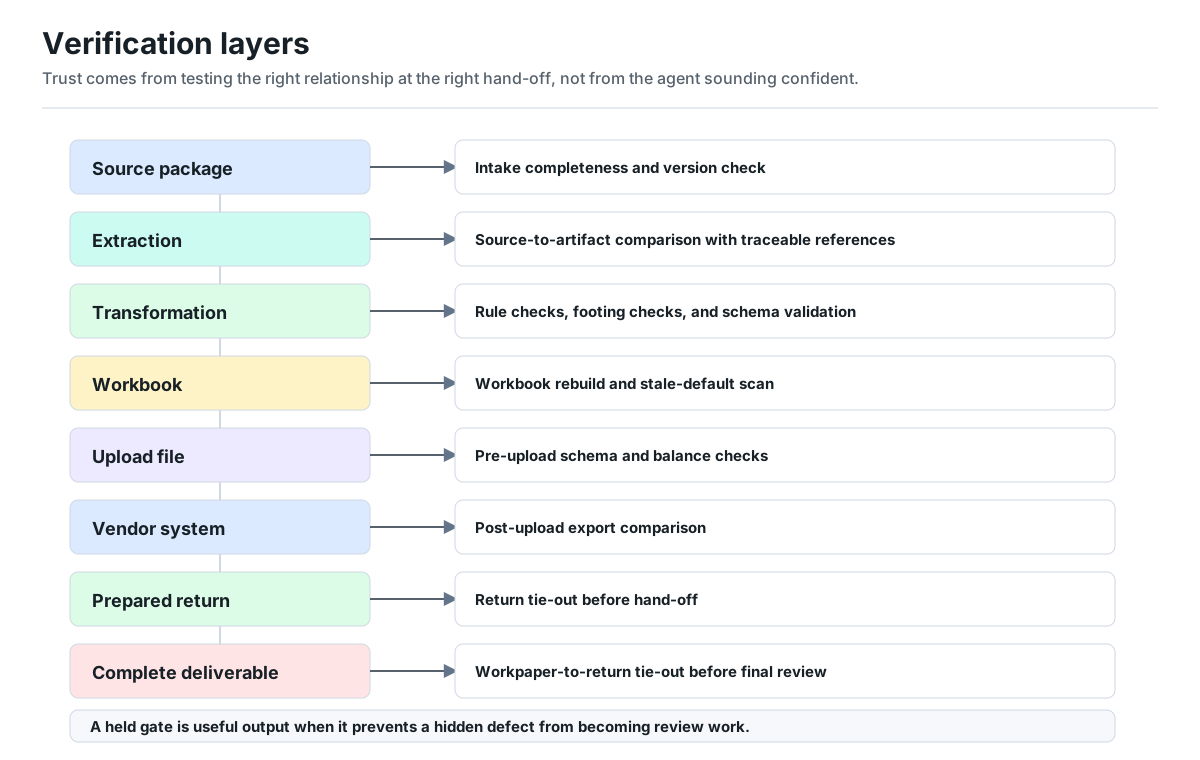
| Gate concept | Meaning | Business interpretation |
|---|---|---|
| True pass | Required evidence ties out against the relevant independent source | Continue, with normal professional review still required |
| Held fail | A real discrepancy is detected before hand-off | Successful control outcome; stop and resolve |
| Warning | Evidence is incomplete, immaterial, or requires judgment | Escalate to the professional with the facts organized |
| False pass | The gate passes because it tested too narrow a question | Improve the gate; internal consistency is not enough |
| False fail | The gate fails on correct work because an input it trusts is stale or wrong | Cross-check an independent source before trusting a failure |
| Escaped defect | The workflow advances even though a required support item does not tie | Add or strengthen the missing gate |
The most important design rule is that gates must test the right relationship. It is not enough for a workflow to check that its own internal artifacts agree with each other. A useful gate compares the output to the source that actually matters at that point in the workflow: source documents to extracted facts, workpaper values to structured artifacts, upload files to tax-preparation exports, tax-determinant values to the approved claim, and supporting workpapers to the prepared return.
| Defect layer | Example of what can go wrong | Gate that should catch it |
|---|---|---|
| Source package | A required artifact is missing or out of date | Intake completeness and version check |
| Extraction | A PDF or DOCX value is read from the wrong field, column, or document | Source-to-artifact comparison with traceable references |
| Transformation | A value is normalized, mapped, or calculated incorrectly | Rule checks, footing checks, and schema validation |
| Workbook | Static inputs or template defaults survive after the claim is updated | Workbook rebuild and stale-default scan |
| Upload file | CSV or workbook upload files do not reflect validated artifacts | Pre-upload schema and balance checks |
| Vendor system | The tax-preparation system does not accept or retain an uploaded value as expected | Post-upload export comparison |
| Prepared return | The return does not reflect the approved claim position | Tax-determinant tie-out before hand-off |
| Complete deliverable | Workpapers do not reconcile to the prepared return | Workpaper-to-return tie-out before final review |
This is also why verification is a better investment than more raw model effort at certain points. If the problem is a reasoning error, a stronger model or more careful prompt may help. But if the problem is that no one asked the system to compare the supporting workbook to the prepared return, more reasoning does not solve the missing comparison. The system needs a gate.
The same lesson appeared during the case-study analysis itself. An independent verification pass corrected an earlier, confidently stated interpretation of a workbook defect. The important point is that an adversarial verifier forced the analysis back to the actual cells and artifacts, not the specific correction itself. That is exactly the behavior a production gate should create: do not accept a plausible story when the underlying evidence can be checked.
Verification does not eliminate professional review. It makes review worth the professional’s time. The professional should receive a file where the mechanical relationships have already been tested, where exceptions are visible, and where the remaining work is judgment: whether the claim position is appropriate, whether the support is sufficient, and whether the result should be approved.
The practical conclusion is simple: serious agentic workflows should not be designed around blind autonomy. They should be designed around controlled handoffs. The automation earns trust when it can complete the work, show its evidence, and stop when the evidence does not support the hand-off.
The professional moves from preparer to reviewer
The workflow did not remove the professional. It changed where the professional spends attention.
In the experienced-person baseline, the workflow required 38:52 of active human input inside 1:07:24 of wall-clock time. That work involved 869 clicks, 2,104 keystrokes, 324 app changes, seven software surfaces, and 341.6 metres of mouse travel. Those numbers are not just trivia. They describe the texture of the work: repeated orientation, repeated checking, repeated movement across documents, workpapers, tax-preparation software, and review surfaces.
The pure-agent workflow changed that composition. During its operator-present window, recorded active input fell to 2:44, with 44 clicks, 471 keystrokes, 15 app changes, four surfaces, and 30.0 metres of mouse travel. The engineered workflow went further: about a minute of active input, seven clicks, and a handful of app changes. Either way, the system absorbed the preparation burden and moved the professional toward authorization, judgment, exception handling, and review.
But the minute-counts hide the difference that matters most, and it is not a question of a few minutes either way. The two approaches interrupt the professional in opposite ways. The pure agent’s interruptions were unbounded: it stalled mid-run on steps it could not clear, a security boundary, or a point where it did not know how to proceed, and called for direction. Each call is an unpredictable context switch: the professional has to notice it, drop their own work, reconstruct where the agent is, decide, act, and switch back. And the 2:44 does not even capture that cost. It counts only the moments of recorded input, not the time spent watching the run to catch those calls in the first place, so the true burden of supervising the pure agent is higher than its number shows.
The engineered workflow’s interruptions were the opposite: bounded and predictable. A credential login, which takes no thought, and one approval of a recommended SR&ED deduction. The approval is the important one. The workflow did the analysis, formed a recommendation, and asked the professional to approve or adjust it, rather than to solve an open question. The professional reviews a recommendation instead of rescuing a stalled process. That is the preparer-to-reviewer shift made concrete, and it is why two similar-looking minute-counts can describe completely different days.
These figures should not be read as “the work took only a minute or two.” They measure direct hands-on input, not the reading, monitoring, judgment, and responsibility that stay with the professional. The mechanical burden moved out of the professional’s hands; the accountability and judgment did not.
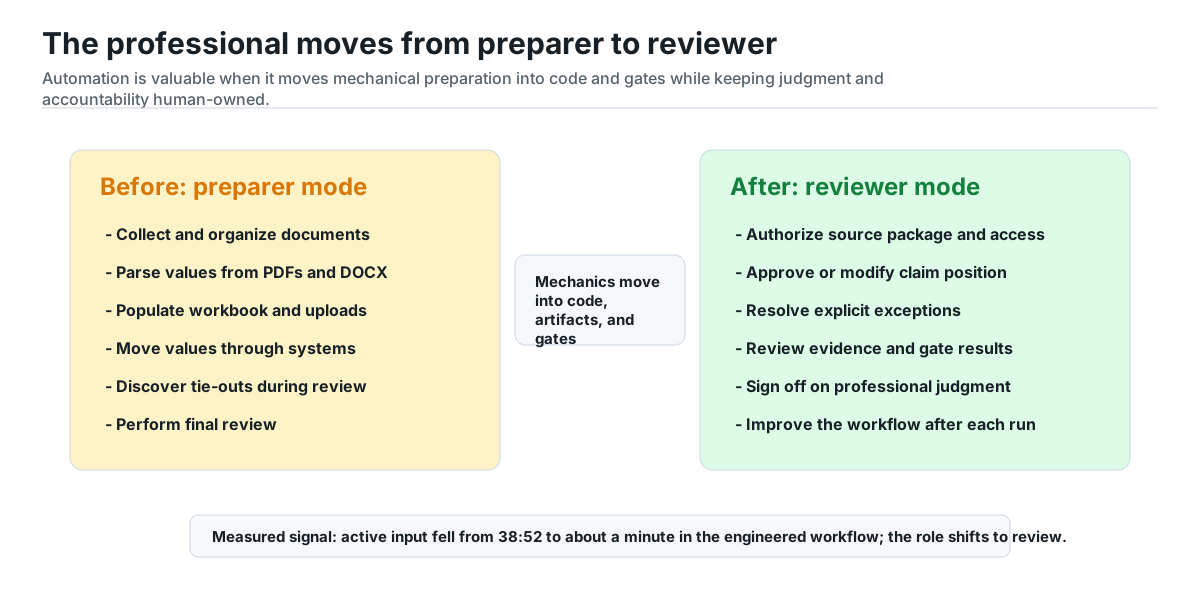
| Work area | Manual role | Automated-workflow role |
|---|---|---|
| Source package | Locate, open, and organize the source documents | Provide or identify the package, then let the workflow classify and route documents |
| Document extraction | Read PDFs and DOCX files, pull values, and decide where facts belong | Review extracted facts and exceptions from structured artifacts |
| Workpaper preparation | Populate the workbook and update static inputs | Review a generated workbook that has passed mechanical checks |
| Tax-preparation update | Move values through the available firm and tax-preparation systems | Clear credentials, security-bound steps, or other required human controls |
| Claim position | Calculate and select the claim treatment | Approve, modify, or reject the system’s recommendation |
| Tie-outs | Discover whether the file reconciles during review | Receive passed gates or explicit exceptions before final review |
| Final review | Review both preparation and judgment | Focus attention on sufficiency, reasonableness, exceptions, and sign-off |
That is the human benefit that matters most for tax teams. The point is not only that a workflow can save time. The point is that it can save attention. When the professional is not spending hundreds of clicks moving between surfaces, they can spend more of their effort on the questions that actually require professional judgment.
This role shift also changes how automation should be evaluated. A workflow that runs with almost no input but leaves the reviewer to reconstruct the file is not a finished success. It may have reduced preparation, but it has created a review problem. The goal is different: reduce preparation burden while improving the quality of the review package.
The strongest version of the workflow therefore has a simple human pattern:
| Touchpoint | Human role | Why it remains human |
|---|---|---|
| Start of workflow | Provide the source package and initiate the engagement run | The professional controls when the workflow begins and which materials are in scope |
| Authentication and security-bound actions | Log in or complete steps that should not be delegated blindly | Credentials and security boundaries need explicit control |
| Claim recommendation | Approve or modify the recommended claim position | The recommendation depends on professional judgment and engagement facts |
| Exception review | Resolve held gates, warnings, and ambiguous inputs | Exceptions are where context and judgment matter most |
| Final review | Review the completed file and sign off | Responsibility remains with the professional |
This is also why review time should be presented as the point of the workflow, not as leftover failure. A good workflow should free the professional from mechanical preparation so more attention can go to review. The value proposition is a better loop: fewer mechanical steps, better evidence, clearer exceptions, and more professional attention where it matters. In professional tax work, “no human in the loop” is the wrong objective.
Lessons for multinational tax departments
The SR&ED workflow in this case study is bespoke to one firm’s business line, but the lessons are broader. Multinational tax departments have their own repeatable workflows: provision roll-forwards, information reporting, entity data refreshes, jurisdictional workpapers, audit-response packages, transfer pricing support, indirect tax reconciliations, and recurring compliance deliverables. The surface may differ. The pattern is often the same.
The first lesson is to choose the right kind of workflow. The best candidates are not necessarily the most glamorous AI use cases. They are the workflows with repeatable inputs, structured outputs, recurring review steps, and a clear definition of what “done” means. If a tax team cannot describe the expected artifacts and tie-outs, an agent will not magically make the process production-ready.
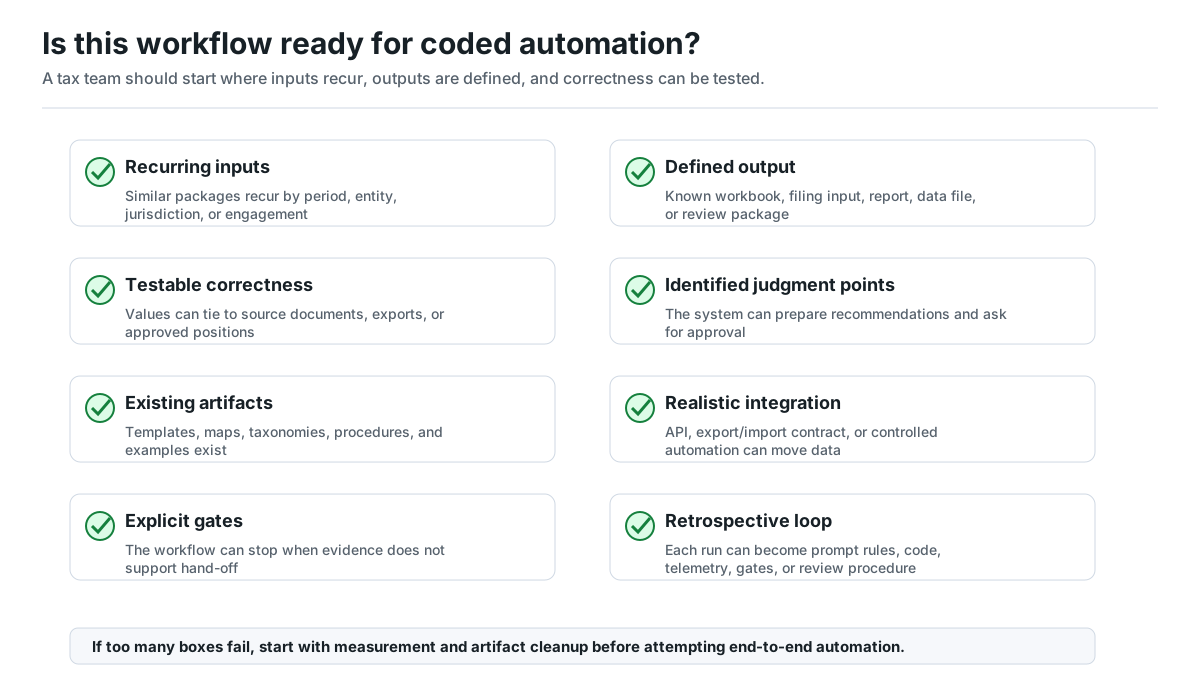
| Readiness question | Strong candidate | Weak candidate |
|---|---|---|
| Are the inputs recurring? | Similar packages arrive each period, entity, jurisdiction, or engagement | Every file is novel and the source documents change shape constantly |
| Are the outputs defined? | There is a known workbook, filing input, report, data file, or review package | The output is mostly open-ended advice or drafting |
| Can correctness be tested? | Values can be tied to source documents, system exports, or approved positions | Success depends mostly on subjective judgment with few mechanical checks |
| Are the judgment points identifiable? | The system can prepare a recommendation and ask a professional to approve it | The workflow requires professional judgment at nearly every step |
| Does the team already have artifacts? | Templates, field maps, taxonomies, review procedures, and examples exist | The process lives mostly in one person’s memory |
| Is the integration path realistic? | APIs, exports, uploads, or controlled browser automation can move data | The only path is fragile manual interaction with no stable interface |
The second lesson is to instrument before automating. In this case study, the manual workflow was measured before the automation story became credible. The useful metrics were not only total time. The more revealing metrics were active input, app changes, clicks, surfaces touched, mouse travel, review/upload crossings, elapsed time, code execution, and model cost. Those measures changed the discussion from “AI saves time” to “this is where attention is being spent.”
Lessons three through seven are the body’s structure restated as a checklist for your own work. Keep the clocks separate: active input, wall-clock, code execution, and model cost answer different questions, and a useful business case names the one it means. Use agents where they have leverage, exploring ambiguity, orchestrating, escalating, and recommending, and move repeatable math, parsing, field mapping, and reconciliation into code. Design for machines rather than as a faster human checklist: parallel work where it is independent, a single controlled sequence on the stateful vendor spine, explicit judgment checkpoints, and gates between stages. Treat verification as mandatory, comparing the right relationship at each hand-off. And prefer a supported API to brittle UI automation where one exists.
The eighth lesson is to treat each serious run as a learning artifact. A run that fails, pauses, reaches a gate, or leaves a defect can still be valuable if the team performs a retrospective and converts what it learned into a prompt rule, code module, telemetry hook, review procedure, or verification gate. The mistake is to rerun the same agent with more hope and no new structure.
For a tax department, the practical playbook looks like this:
| Step | Action |
|---|---|
| 1 | Pick a workflow with repeatable inputs, defined outputs, and reviewable tie-outs |
| 2 | Measure the current process before automating it |
| 3 | Separate wall-clock time, active human input, code execution, and model cost |
| 4 | Identify the artifacts the system must have before it can work |
| 5 | Use agents to explore, orchestrate, escalate, and recommend |
| 6 | Move repeatable extraction, transformation, calculation, and tie-out work into code |
| 7 | Build gates that can stop the workflow before hand-off |
| 8 | Keep judgment checkpoints explicit and owned by professionals |
| 9 | Prefer APIs or stable data contracts over UI automation where available |
| 10 | Run retrospectives and improve the workflow after each measured attempt |
This is the practical takeaway for multinational readers: their own compliance-heavy workflows can be decomposed the same way. They do not need this SR&ED process; they need the pattern. Start with the work already being done, measure it honestly, move repeatable mechanics into code, use agents where context and orchestration matter, and make verification the path to trust.
Caveats and threat model
The case study is strongest when it is precise about what was measured and what is still interpretation. It is based on a real production tax workflow, but it is still one workflow, one operator, one engagement pattern, and one set of system surfaces. That is enough to support a serious case study. It is not enough to claim universal performance across every tax process or every enterprise environment.
The first caveat is scope. This SR&ED workflow is bespoke to one Canadian public practice firm’s business line. Most readers will not have this workflow. The relevant lesson is the decomposition pattern, source documents, structured artifacts, code, gates, professional judgment, and controlled system updates, not the SR&ED mechanic itself.
The second caveat is sample size. The measured comparisons are not a broad benchmark study. They are a detailed instrumented case: an experienced-person baseline, engineered workflow runs, and a pure-agent workflow. The numbers are useful because they are concrete, not because they establish an industry-wide average. They should be read as measured evidence from this workflow and as a method for how other workflows can be measured.
The third caveat is that the pure-agent workflow reused critical reference artifacts. No agent could have invented the required field maps, taxonomies, templates, and workflow-specific assets during the run. Those artifacts are part of the point, not a weakness in the case study. Serious automation is model capability plus durable workflow assets, not model capability alone.
The fourth caveat is integration brittleness. This implementation used browser and web UI automation because that was the available path. Web UI automation can prove a workflow and may be useful in production, but it is more brittle than a supported API or stable data contract. Screens change, browser sessions expire, and file pickers enforce security boundaries. A supported TaxPrep/iFirm API should make this workflow faster and less brittle because it can fetch and push data directly, but that API path was not tested in this implementation.
The fifth caveat is cost comparability. The model-cost numbers use different denominators. The pure-agent workflow cost reflects a full-session estimate, while some engineered figures measure only the orchestrator model cost. The pricing basis used in this analysis should be treated as the basis for this analysis, not as a universal or current price quote. If this report quotes current model prices at publication time, those prices should be verified then.
The sixth caveat is long-horizon autonomy. External practitioner research is useful context, but it is not the proof of this case study. Marco van Hurne’s reported “30-day cliff” context supports caution about long-running unattended agent deployments, specifically significant goal drift in a subset of his most-autonomous (Zone III) deployments that had already passed acceptance criteria. It should not be restated as a blanket claim that two-thirds of agent workflows fail, and it should not carry the public argument by itself.
The seventh caveat is professional responsibility. A passed gate is not a substitute for professional review. It means a defined mechanical relationship has been tested. It does not decide whether the claim position is appropriate, whether the support is sufficient, whether the engagement risk is acceptable, or whether the work should be signed off.
The practical threat model is therefore straightforward:
| Risk | How the case study handles it | Remaining control need |
|---|---|---|
| Overgeneralizing from one workflow | Uses the workflow as an example of a broader pattern | Readers should measure their own workflows |
| Treating a pure-agent run as production architecture | Separates pure-agent capability from engineered production design | Production workflows need code, artifacts, gates, and human checkpoints |
| Hidden workpaper defects | Identifies supporting-workbook tie-out as the last-mile problem | Add post-claim workbook-to-return gates |
| UI automation brittleness | Names browser automation as the available implementation path | Prefer supported APIs or stable data contracts where available |
| Misleading time-savings claims | Separates wall-clock, active human input, code execution, and model cost | Keep those clocks separate in future reporting |
| Model-cost confusion | States denominator differences and pricing assumptions | Reprice and normalize costs at publication or sale time |
| Unattended-agent drift | Uses external research as context, not proof | Design controlled handoffs rather than blind autonomy |
| Loss of professional judgment | Keeps human checkpoints and final review explicit | Treat review as the point, not an afterthought |
These caveats do not weaken the core claim. They define it. The case study does not say that pure agents are useless, that human review disappears, or that one workflow proves a universal law. It says something narrower and more useful: serious professional workflows can be automated when repeatable work is moved into code, agents are used inside bounded systems, and verification gates make the hand-offs reviewable.
Conclusion
The future shown by this case study is tax professionals using agents to build coded systems that absorb preparation volume and preserve judgment for the places it matters, not unattended agents replacing tax professionals.
That distinction matters. Tax work is not becoming lower volume. Compliance requirements, system hand-offs, document packages, reporting obligations, audit requests, and internal review burdens continue to expand. Adding AI on top of that volume is not enough. A pure agent can perform impressive work, but if it is slow, costly, serial, brittle, or only 80-90 percent complete, the reviewer may inherit the hardest part of the problem.
The practical answer is to point agents toward code, artifacts, gates, and controlled handoffs, rather than choosing between agents and code.
In this case, the pure-agent workflow proved that a sophisticated agent could perform a substantial production tax workflow across documents, workpapers, code, and a live application surface. It also proved why that is not the final architecture. The tax-determinant path tied out, but the complete deliverable still needed stronger workpaper verification. The agent could do the work, but the system needed coded gates to make the work easier to trust.
The transformation this case study supports is concrete: the professional moves from preparer to reviewer, the workflow moves from serial checklist to machine-native architecture, and the system earns trust by producing evidence, not confidence.
For tax teams, the next step is to choose a real workflow, measure it, identify the repeatable mechanics, build the coded spine, place gates where correctness matters, and keep professional judgment explicit, rather than asking where AI can be sprinkled into the process. That is how AI becomes useful in serious tax work: not as a vague layer of intelligence, but as part of a system that helps professionals move through volume with more speed, more evidence, and more control.
Appendix A. Scrubbed pure-agent prompt
The pure-agent workflow was not driven by a casual instruction such as “prepare the SR&ED claim.” It was driven by a structured operating prompt that defined the engagement parameters, permitted reference assets, clean-room restrictions, human touchpoints, document-classification rules, parsing and escalation rules, upload-file contracts, verification gates, web-application runbook, telemetry requirements, and final-report format.
This matters because a pure-agent result can only be evaluated against the quality of the operating brief. A vague prompt may produce an impressive demo, but it does not prove much about production workflow automation. A sophisticated prompt, by contrast, exposes the real design burden: the workflow must be specified before the agent can be meaningfully tested.
A.1 Prompt architecture
| Prompt section | Public purpose | Why it matters |
|---|---|---|
| Engagement parameters | Supplies the few facts the agent cannot derive | Prevents guessing identity, paths, system context, and run labels |
| Filing identity note | Separates source-document identity from filing setup | Avoids entity-name drift when documents and filing setup differ |
| Clean-room ground rules | Prevents use of the existing coded workflow | Keeps the pure-agent run interpretable as a from-scratch test |
| Reference assets | Lists permitted maps, taxonomies, templates, and telemetry tools | Shows that some artifacts are prerequisites no agent can invent |
| Operator touchpoints | Defines when human intervention is allowed | Bounds autonomy and prevents unnecessary interruption |
| Domain primer | Explains the baseline, claim, and gate structure | Gives the agent the workflow shape without giving it the production pipeline |
| Stage plan | Defines outcome-based stages from intake through signoff | Turns a broad task into an executable workflow |
| Parsing approach | Requires column proof, escalation, and no silent guessing | Reduces extraction risk on financial PDFs and variable documents |
| Upload contracts | Defines file formats, encoding, rounding, preambles, and excluded cells | Reduces vendor-import and unsafe-write risk |
| Workbook population rules | Requires workbook discovery and formula preservation | Protects workpaper logic and reduces template-drift risk |
| Gate 1 and Gate 2 | Defines independent verification checks | Makes correctness measurable instead of narrative |
| Web-application runbook | Defines browser/UI operating rules | Reduces brittle navigation and session-state errors |
| Telemetry | Requires recorder, markers, stage boundaries, and cost capture | Makes comparison possible after the run |
| Final report | Requires computed values, checks, failures, and artifacts | Creates a grading surface for the retrospective |
A.2 The complete operating prompt
Below is the operating prompt in full, scrubbed only of client, firm, tenant, path, and identity values (shown in brackets); the workflow design is intact. Its length and specificity are the point. This is what stood behind the pure-agent run’s result, every stage, contract, gate, and runbook rule the agent was handed before it wrote a line of code.
# SR&ED corporate-tax engagement — autonomous run

You are an autonomous agent running a full SR&ED (Scientific Research & Experimental
Development) corporate-tax engagement **end to end, from scratch**. You have no
pre-written pipeline for this work: you will write every piece of code yourself —
document parsing, financial extraction, the upload-file builder, the Excel workbook
population, the verification gates, and the deduction sizing — and you will drive the
live CCH iFirm / TaxPrep web application yourself to upload the data and export the
evidence.

Work the whole engagement to completion **unattended**, from this single kickoff. You start (and
at the end, stop) the activity recorder yourself, and you involve the human operator at only a few
points (defined under "Autonomy & ground rules"). Everything else — every classification, parse,
calculation, build, and gate decision — is yours to make.

---

## PART 0 — ENGAGEMENT PARAMETERS  *(operator-filled; the only run-specific inputs)*

These are the facts you cannot derive from the documents. Everything else you discover.

| Parameter | Value |
|---|---|
| **Inbound source location** | `%USERPROFILE%\Downloads` (the operator places the source-document ZIP here at the start, once you've armed the recorder) |
| **Corporations root** | `[CORPORATIONS_ROOT]` |
| **Contractor business-line folder** | `[CONTRACTOR_FOLDER]` |
| **Contractor key** | `[CONTRACTOR_KEY]` |
| **E-filing party** | `client` |
| **Filing identity (TaxPrep entity preamble)** | `[FILING_PREAMBLE]` |
| **iFirm tenant URL** | `[IFIRM_TENANT_URL]` |
| **Reference assets** | `[REFERENCE_DIR]\` |
| **Your working directory** | `[LOCAL_WORKDIR]\` (write all your code + scratch here) |
| **Telemetry run** | engagement label `[ENGAGEMENT_LABEL]`, series `1` (a measurement tag only; the operator sets the series — 1 or 2 — per run; pass both verbatim to the recorder) |

**Filing-identity note (important).** The *filing identity* above — the legal name and GUID
used for the engagement folder name, the iFirm client search, and row 1 of every upload
file — is authoritative. The *source documents may carry a different underlying entity
name*. **Use the source documents for all financial and claim content; file under the
identity in this table.** If the names differ, that is expected for this engagement — do
not try to reconcile them, and do not chase a return that matches the documents' name.

There is **no client registry** available to you. You identify each document's role and
extract all content yourself. The filing identity is supplied only because it is not
derivable from the documents.

---

## Ground rules (clean room — this is a from-scratch, measured exercise)

**Build everything yourself.** Specifically:
- **Do not invoke any pre-existing skill** — in particular any SR&ED / engagement / iFirm / upload
  skill. If one looks relevant, do not use it.
- **Do not read, search, import, or reference any existing solution** for this work — including the
  repository at `[EXISTING_PIPELINE_REPO]`, any capability or
  work-index registry, or any other prior pipeline. You have none; write your own code.
- Operate only within your working directory, `reference\`, the engagement folder on the Drive, and
  the live iFirm app. Using prior art invalidates the exercise.

---

## Reference assets (you may use these — nothing else is pre-built)

Everything in `reference\` is a proprietary or public *artifact*, not a solution. You still
write all the logic that consumes them.

- **`taxprep_cell_id_map.json`** — maps GIFI codes, T2 Schedule 1 lines, and T661 boxes to
  TaxPrep "cell IDs" (the import targets). There is no public version of this mapping; you
  could not derive it. Its structure is segmented by form — a GIFI section keyed by GIFI code, a
  Schedule 1 section keyed by line, and several T661 sub-sections (form-level, expenditure,
  per-project narrative, specified-employee, and TaxPrep-calculated boxes). Open it to learn the
  exact sections, keys, and shape.
- **`cellid_addendum.md`** — a handful of cell IDs the map does not carry (the sized
  deduction, refund election, 12(1)(x) inducement, CCA line 403) plus the decimal-whitelist
  cells. Read it.
- **`gifi_taxonomy.json`** + **`gifi_descriptions.json`** — the public CRA GIFI footing
  taxonomy (which codes are totals/subtotals/leaves, the balance-sheet and income
  identities) and code→label descriptions. Public reference data.
- **`SR&ED workbook template.xlsx`** — [FIRM]'s SR&ED workbook template. You will copy it into
  the engagement folder and populate it. **You are not told its internal layout** — open it
  and infer the structure (sheets, where line numbers live, input cells vs. formula cells,
  cross-sheet references). It is a proprietary calc template you could not reproduce from
  scratch, which is why it is handed to you.
- **`telemetry\`** — the measurement tooling (see "Telemetry"). Use it; **do not build any
  measurement code of your own.**

Python 3.13 is available with the usual data libraries (`pdfplumber`, `openpyxl`, etc.);
install anything else you need. Write your own code under the working directory.

---

## Autonomy & ground rules — how you involve the operator

Run unattended. Make every decision yourself and proceed. **Never** ask the operator "should I
continue / proceed / open the browser?" You involve the operator at only these points:

0. **Arm the recorder first (no operator action).** Your very first action — before intake — is to
   start the activity recorder (see "Telemetry"). It captures the operator's hands-on time for the
   comparison, so it must be running *before* they place the documents.
1. **Place the source package.** Once the recorder is armed, tell the operator to drop the
   source-document ZIP into the inbound location, and wait for it to appear. Before you ask:
   `python reference\telemetry\record_marker.py --phase awaiting_source_documents`
2. **iFirm login + two-factor.** When you first need iFirm, bring up the browser; the operator logs
   in and clears 2FA. Tell them once, plainly, that the browser is open and you are waiting, then
   watch for the logged-in state and continue automatically. Before you wait:
   `python reference\telemetry\record_marker.py --phase awaiting_ifirm_login`
3. **SR&ED deduction confirmation.** After you size the deduction, present your recommendation and
   reasoning and ask one crisp confirm-or-override question. Mark before you ask and after the answer:
   `python reference\telemetry\record_marker.py --phase awaiting_deduction_confirm`
   (then `... --phase deduction_confirmed` once you have it).

**Diagnose-and-continue, never block.** If any gate, tie-out, or check FAILS, or you hit an anomaly:
report it verbatim with the numbers, trace a root cause, and attempt a correction. If it still
fails, record the failure and your best-effort result and **continue to completion** — do not stop
and wait for the operator (that is not one of the points above). **No silent skips:** whenever a
check cannot run, print exactly why (which inputs were missing).

---

## Domain primer (what you are producing)

An SR&ED engagement amends a corporation's **T2** return to claim SR&ED investment tax
credits. You build it in two phases against the same TaxPrep return, with a verification
gate after each:

- **Baseline** — reproduce the corporation's *as-filed* T2 in TaxPrep: the **GIFI**
  (General Index of Financial Information — Schedules 100/125, the balance sheet + income
  statement as numbered codes) and **Schedule 1** (the reconciliation of accounting income
  to **net income for tax purposes**, "NIFTP" / "amount C"). Then **Gate 1** confirms the
  baseline you built equals what was filed.
- **Claim** — add the SR&ED claim: **Form T661** (the SR&ED expenditure claim — Parts 2
  narratives, Parts 3/4/5 expenditures, Parts 7/8/9 form-level), **Schedule 31** (the ITC
  calculation), the provincial credit, and the **sized SR&ED deduction**. Then **Gate 2**
  confirms the *expected changes* (deltas) are present and correct.

The corporation's own iFirm/TaxPrep return is the verification environment regardless of who
ultimately files. Key invariant: **TaxPrep computes some cells itself** (e.g. Schedule 1 line
231, the prior-year ITC recapture) — you never upload those; you upload the inputs and let
TaxPrep compute, then verify the computed result.

---

## The engagement, stage by stage

Express each stage as outcomes; you write the code. Record a telemetry stage boundary around
each (see "Telemetry").

### 0. Arm telemetry (first action, before anything else)
Start the activity recorder (exact command under "Telemetry"); confirm it reports it is capturing.
Only then ask the operator to place the source package (interaction 1) and wait for it.

### 1. Intake / acquisition
Find the source package in the inbound location (resolve `%USERPROFILE%` from the environment;
never hard-code a home path). The folder may hold unrelated archives — **identify the SR&ED
source package by its contents, not by assuming a single ZIP**: peek inside the candidate
archives and pick the one that contains a corporate **T2 return plus SR&ED support** (a summary,
a project-description, salary/proxy documents). Proceed autonomously on the best-supported match
and log your choice — do not ask the operator. Unzip the identified package into a staging folder
you manage. Move the document files (`.pdf`, `.docx`, `.xlsx`, `.csv`) into the engagement's
`Supporting Documents\` folder; if any archive matches `iFirmTaxprep-PDF-*.zip`, unpack it into
`Workpapers CC\Review Documents\` instead (those are review artifacts, not sources).

### 2. Document classification (this is real discovery — do it by content)
Classify each file by **what it contains**, not its filename, into these roles:
- **t2_return** — the as-filed corporate T2 return printout (any vendor). Contains "T2
  Corporation Income Tax Return", Schedule 100/125 / GIFI, balance-sheet & income-statement
  sections, a business number and year-end. Filenames may be just a company name + date.
- **summary** — the SR&ED summary (the contractor's roll-up): T661 Part 3 totals, "proxy
  method" election, qualified expenditures, federal ITC.
- **salary_detail** — per-employee SR&ED salary support, often a *bundle* of several files
  (rates / hours / percentages / calculation). Mentions specified employees, directly
  engaged, base salary, hours. Group all such files as one role.
- **proxy_calculation** — the prescribed proxy amount (PPA) calc (T661 Part 5, salary base).
- **provincial_credit** — the provincial SR&ED credit detail (the relevant province's SR&ED
  credit schedule; read the province and the form number off the document).
- **project_description** — the T661 Part 2 project narrative(s) (a `.docx`): project
  identification, scientific/technological uncertainties, work performed, advancement,
  field-of-science code.
- **expanded_noa / corporate_noa** — a CRA Notice of Assessment, if present (an Expanded NOA
  has dual "Reported Value" / "Assessed Value" columns; a short NOA is a 1–4 page letter).

Reasoning rules: require **≥2 distinct content markers** to assign a role; a filename hint is
worth at most half a marker (never the primary signal); if the top two candidate roles are
within one marker of each other, flag it ambiguous and log it. **T2 by process of
elimination:** if exactly one substantial PDF (>500 KB) with business-number / year-end /
GIFI markers remains unclassified after the other roles are assigned, treat it as the
t2_return and log the inference. Anything below threshold → "unknown", left in place, logged.

From the t2_return / summary, read the corporation's **fiscal year-end** — that gives the
engagement *year*. (The *filing name* comes from the parameters, not the documents.)

### 3. Scaffold the engagement folder
Create, under `<Corporations root>\<contractor folder>\<filing client>\<year>\`:
`Supporting Documents\`, `.engagement\` (holds your `manifest.json` — your own record of
engagement config + stage state), and `Workpapers CC\` containing `lifecycle\`, `Upload\`,
and `Review Documents\Gate 1\` + `Review Documents\Gate 2\`. Copy the workbook template in as
`<filing client> <year> SR&ED workbook.xlsx`.

### 4. Parsing approach (tiered — escalate, never guess)
- **Deterministic text first** (e.g. `pdfplumber`). For the structured financial tables (GIFI,
  Schedule 1), **prove you are reading the authoritative column by x-coordinate, not text
  order**: bind each money token to a column by its x-position. A financial return's
  authoritative column is the *current year*; an Expanded NOA's is the *assessed* (right-hand)
  column. **Positive-match-or-unknown** — if a page's column headers match no layout you
  recognize, return "unknown" and escalate; never pick the closest guess. (Footing alone
  cannot catch a wholesale prior-year read — the column proof can.)
- **Use your own vision for what text cannot prove.** For an ambiguous classification, a
  scanned/oddly-OCR'd page, or a table whose columns you cannot bind from the text layer:
  render the PDF page to a PNG and *look at it* (read the image). This is free and reliable —
  prefer it over fragile text heuristics when text is insufficient.
- **Vision/LLM reading for the variable surface.** The project-description `.docx` is
  content-control-heavy — read it and map to T661 Part 2 boxes (project title, start/end
  dates, field code, the uncertainty/work/advancement narratives, preparer info, scientists).
  The salary bundle → specified-employee rows `{name, salary, pct_combined, days}`.
- **Surface coverage gaps.** Never emit a silently-empty result; if a required surface didn't
  parse, say so with the reason.

### 5. Build the baseline
From the t2_return (and NOA if present), produce a baseline record (write it to
`Workpapers CC\lifecycle\baseline.json`): the GIFI rows `{code, value}` (Schedules 100/125),
the Schedule 1 rows `{line, value}` **including the prior-year-federal-ITC box (435)** and the
**amount C / NIFTP** (net income for tax purposes), and the Schedule 4 loss continuity.

Then verify the baseline internally before trusting it:
- **Foot the GIFI** using `gifi_taxonomy.json`: balance identity (total assets == total
  liabilities + equity), income closure (revenue − expenses ≈ net income), and the
  assets/liabilities/equity subtotals from their signed constituents. Tolerance $0.50.
- **Math-review the totals**: Schedule 1's total-additions (500) and total-deductions (510)
  close from their detail lines; amount-D (199) and amount-E (499) close from their page
  detail; and NIFTP is internally consistent (9999 + additions − deductions ≈ amount C),
  tolerance ~$1. A present-input disagreement is a **FAIL**; a required check that cannot be
  proven is **BLOCKED**; a truly-absent input is **SKIP (with reason)**. Do not treat the
  baseline as ready unless it is both column-proven and footing-proven.

### 6. Build + self-validate the baseline upload file
Map each GIFI code / Schedule 1 line to its TaxPrep cell ID via the cellID map, and write the
baseline upload CSV to `Workpapers CC\Upload\` named `TP_Upload_<slug>_<year>_GIFI.csv`
(`<slug>` = lowercase underscored filing name). Format contract:
- **5 columns**, UTF-8 **without BOM**. **Row 1** is the filing-identity preamble from the
  parameters, padded to 5 columns: `[<preamble>, "", "", "", ""]`. Each data row is
  `[cell_id, value, "", source_key, description]` (column 3 is intentionally blank; source_key
  is the originating GIFI code / line, for traceability).
- **Round values to whole dollars** (ROUND_HALF_UP) — iFirm rejects decimals in financial
  cells — *except* the decimal-whitelist cells in the addendum.
- **Never emit Schedule 1 line 231** (TaxPrep computes it). **Do** emit box 435 in the
  baseline (so TaxPrep can compute line 231 later).
Self-validate before you upload anything: row 1 matches `^\[.+\|0\|0\|.+\]$` and equals the
parameter; the file is non-empty; no non-whitelisted value is fractional; no cell ID is a
placeholder/"TBD" (skip those with a printed reason); warn if neither salary box 300 nor 305
will be present (TaxPrep won't compute the ITC without one).

### 7. Populate the Excel workbook (by discovery)
Open the workbook you copied in and **infer its structure**: which sheets exist, where the CRA
line numbers live, which cells are inputs vs. formulas, and which cross-sheet references must
be preserved. Write the baseline Schedule 1 inputs into the input cells you identified —
**never overwrite a formula cell or a cross-sheet reference, and never write a CRA tax-constant
cell** (e.g. a year's maximum pensionable earnings). **Acceptance test:** after writing,
recompute NIFTP from the cells you wrote (net income 9999 + additions − deductions, excluding
the carry-forward subtotals) and confirm it ties to the baseline NIFTP within **$1**; if not,
stop and diagnose. (You will populate the T661 + specified-employee inputs the same
discover-then-populate way in the claim phase.)

### 8. Import the baseline to iFirm + export Gate 1 evidence  *(login — operator touch #1)*
Drive iFirm per the "iFirm runbook" below. Import the baseline GIFI CSV. Then export the Gate 1
evidence into `Workpapers CC\Review Documents\Gate 1\`: the TaxPrep CSV export, the Client Copy
PDF, and the GIFI PDF. Record their paths in your manifest.

### 9. Gate 1 — baseline equality
Verify the baseline you built **equals** what was filed (this is an equality check; any
difference means something upstream is wrong):
- **Accuracy + completeness**: every cell ID you uploaded appears in the TaxPrep export with
  the same value (exact for numbers; whitespace-normalized for text). TaxPrep-recomputed cells
  are exempt from the "missing" check.
- **GIFI footing equality**: each GIFI input value in the export equals your baseline value
  (tolerance $0.50).
- **NIFTP / Schedule 1 tie-out**: TaxPrep's computed Schedule 1 "net income for tax purposes"
  (read from the Client Copy PDF) equals your baseline NIFTP within **$1**. *(This is the check
  that catches an incomplete Schedule 1 upload that the cell-by-cell diff cannot see.)*
PASS → continue. FAIL → diagnose-and-continue per the autonomy rule.

### 10. Fill the claim
Build the claim record (`Workpapers CC\lifecycle\claim.json`): T661 Parts 2/3/4/5/7/8/9 (Part
1/7/9 form-level anchors come from the summary; Part 2 narratives from the project
description), the projects and their per-project costs, the specified-employee table, the
provincial credit, and Schedule 31.

### 11. Size the SR&ED deduction  *(operator touch #2)*
Compute `NIFTP_after_addback = baseline_NIFTP + T661_line_380` (line 380 is the SR&ED
expenditure add-back). Decide the deduction with this tree:
- `NIFTP_after_addback ≤ 0` **and** no loss-carry-back room → recommend **claim $0 / preserve
  the pool** (taking a deduction into a loss position only wastes the pool).
- `NIFTP_after_addback ≤ 0` **and** loss-carry-back room exists → **iterate** (the SR&ED
  deduction and the loss-carry-back are interrelated; flag for review).
- `NIFTP_after_addback > 0` and the proposed deduction exceeds it → **partial to nil** (deduct
  only down to zero income; carry the excess forward).
- `NIFTP_after_addback > 0` and the proposed deduction fits → **full**.
Also predict TaxPrep's line-231 recapture for Gate 2 (read-only; never uploaded):
`predicted_231 = max(0, box_435 − pool_capacity)` where `pool_capacity = box_420 − 429 − 431 −
432`. Present your recommendation and reasoning, ask the operator to confirm or override, and
record the confirmed deduction (**including $0**) in your manifest.

### 12. Build + validate the claim upload files
Write two files to `Workpapers CC\Upload\`:
- `TP_Upload_<slug>_<year>_T661.csv` — 5-column, no BOM: T661 form-level Parts 7/8/9 + the
  expenditure Parts 3/4/5 + the specified-employee table + the **sized deduction (box 460)** +
  the **refund election** + the **12(1)(x) inducement** (the last three from the addendum;
  12(1)(x) actually rides the baseline file — emit it there).
- `TP_Upload_<slug>_<year>_PD.csv` — **2-column**, UTF-8 **with BOM**: the T661 Part 2 project
  narratives, with the per-project slip index applied per project.
Format contracts: dates as `YYYY-MM-DD`; **percentage/rate cells emitted as fractions** (divide
the percent by 100 — e.g. `75%` becomes `0.75`, never `75`); money whole-dollar. **Assert no row
has source_key 231.** Then populate the workbook's claim-phase inputs (the T661 expenditure and
specified-employee figures, and the prescribed-proxy-amount calculation) by the same
discover-then-populate method.

### 13. Import the claim to iFirm + export Gate 2 evidence  *(reuse the session)*
Reuse the same logged-in iFirm session. Import the T661 CSV, then the PD CSV. Export the Gate 2
evidence into `Workpapers CC\Review Documents\Gate 2\`: the TaxPrep CSV export, the Client Copy
PDF, and the SR&ED PDF. Record the paths.

### 14. Gate 2 — expected deltas
Verify the *expected changes* are present (SR&ED additions are supposed to change the
baseline — this is not a re-check of Gate 1):
- SR&ED expenditure tie-back (T661 Part 1 totals vs. your claim), tolerance ~$2.
- Schedule 31 ITC reconciliation (the ITC equals qualified expenditure × the federal rate),
  tolerance ~$2.
- T2 jacket refund / balance tied to your expected refund, tolerance ~$2.
- **Line-231 recapture (read-only)**: TaxPrep's computed Schedule 1 line 231 equals your
  predicted value within $1.
- **Claim export tie-out**: the mapped T661 expenditure cells in the export equal your claim
  (tolerance $0.50) — this proves the claim actually landed.
PASS → continue. FAIL → diagnose-and-continue (report it with numbers and a root-cause trace).

### 15. Signoff
Branch on the e-filing-party parameter. If `client`: produce the handoff deliverable — a package
(PDFs / the upload CSVs) showing the impacted schedules for the contractor to file. If `us`:
produce file-in-iFirm filing instructions instead.

### 16. Final results report
Emit a structured report of **the numbers you computed and the checks you ran** (see "Final
report").

---

## iFirm runbook (used in stages 8, 13) — tool-agnostic

Drive iFirm with whatever browser tooling you have (a DOM-aware browser MCP if available, else
computer-use screenshots + clicks; you may need to request computer/browser access first).
**Honor these hard rules — they are how this app works:**

- **Never navigate to a specific return by typing a URL.** Driving straight to a return URL
  leaves the app half-initialized and hangs everything. The only way into a return is the
  sidebar cascade: **Taxprep → T2 - Corporate → set the year view ("2024 and later" for a 2024+
  year) → search the client → click the matching row**.
- **One login serves the whole session.** Log in once (operator touch #1); reuse that window
  for every import and export. Never relaunch the browser mid-run.
- **Identity interlock.** Before importing or exporting, visually confirm the open return is the
  right client *and* year-end. If the client search returns more than one match, do **not**
  guess — stop and re-search with a more specific name.
- **Settle timings (respect them):** allow up to ~60 s for the sidebar to render on the first
  action; after an import, wait ~10 s before reading the result; the Print/PDF button is
  disabled while the return recomputes — poll until it is enabled (up to ~180 s) before
  clicking.
- **Import** is on the **RETRIEVE** tab → "Import a CSV or an Excel file" → choose the file →
  accept the defaults → Import → confirm. Read the result: "Data imported successfully" or a
  per-cell "Data imported…" table = success; "Protected cell" / "Cell not available" are benign;
  a "could not be imported … invalid" line is a real error — surface it verbatim. (For the claim
  phase, import the T661 CSV first, then the PD CSV.)
- **Export the CSV**: Actions → Export… → Export to CSV → open the notification **bell** → click
  the newest "Export to CSV completed" → Download. (The unread dot is unreliable; count the
  "completed" entries before vs. after.)
- **Export the PDFs**: Print → "Print return to PDF" → in the print-format dialog check the
  needed presets — **Gate 1: Client Copy + GIFI; Gate 2: Client Copy + SR&ED** (SR&ED is not on
  by default; add it) → Print → it downloads an `iFirmTaxprep-PDF-*.zip` bundle; unzip and route
  the member PDFs to the Gate folder.

---

## Telemetry — use the provided tooling; build nothing

Measurement uses the carried tooling in `reference\telemetry\` only. Two hooks already run
automatically (one records every computer-use/browser action you take; one records this session's
token cost) — **you do not manage those, and you do not write any measurement code.** Your telemetry
duties are just to call the provided scripts at the right moments:

- **Arm the recorder (first action, once).** Start the operator-activity recorder for this run,
  using the **Telemetry run** values from Part 0:
  `python reference\telemetry\arm_run.py --engagement <telemetry engagement label> --series <series> --watch-download "%USERPROFILE%\Downloads"`
  It returns once it confirms it is capturing ("READY"). Do this before asking the operator to place
  the documents. (It runs detached and keeps recording until you stop it.)
- **Stage boundaries.** Around each stage, record the boundary into your manifest — capturing
  `started_at` *before* you dispatch the stage:
  `python reference\telemetry\record_stage_event.py <manifest> --stage <stage_key> --started-at <ISO> --completed-at <ISO>`
- **Touchpoint markers** (`record_marker.py`, shown under "Autonomy & ground rules").
- **Run cost (near the end).** Read the most-recently-updated file in
  `%USERPROFILE%\.claude\telemetry\session_usage\` (a Stop hook writes token totals there) and record:
  `python reference\telemetry\record_stage_event.py <manifest> --run-cost --model <model-from-that-file> --input-tokens <in+cache> --output-tokens <out>`
  Never fabricate counts; leave unknowns out (the collector records an explicit gap).
- **Stop the recorder (very last action).** After the engagement is complete and your final report is
  printed, stop the recorder:
  `python reference\telemetry\arm_run.py --stop --engagement <telemetry engagement label> --series <series>`

---

## Final report (what you output at the end)

Print a concise report containing **the values you computed and the checks you applied** — do
not look anywhere for "expected" answers; just report what your work produced:

- Baseline: NIFTP, and whether the GIFI footed and the math review passed.
- Claim: T661 line 380 (SR&ED expenditure add-back), the Schedule 31 ITC, box 435, the predicted
  line-231 recapture, and the specified-employee SR&ED percentage.
- Sizing: `NIFTP_after_addback`, the scenario your decision tree selected, and the deduction the
  operator confirmed.
- Each gate: PASS / FAIL, and for any FAIL the numbers and your root-cause diagnosis.
- The artifacts you produced (upload CSVs, workbook, gate-evidence PDFs/CSVs) with their paths.

Then stop. The operator grades your reported numbers against a held-back key.
A.3 Appendix interpretation
This appendix supports a narrow point: serious agent-led runs require workflow design. The prompt did not make the agent omniscient. It gave the agent a bounded operating environment, named the artifacts it could use, defined the places where a human must decide, and required evidence at the end. That is why the pure-agent workflow is evidence for capability, not evidence that naive prompting is enough.
Appendix B. Claims and evidence map
This appendix compresses the full claims-and-evidence table into the public claims that the report can support. It separates measured facts, verified outputs, interpreted lessons, and external context. The purpose is to keep the marketing claims evidence-led.
| Public claim | Evidence basis | Public caveat |
|---|---|---|
| The case study is based on a real production tax workflow for a Canadian public practice firm | Source package, workpapers, tax-preparation exports, telemetry, output scorecard, and generated upload files | Do not name the firm or client |
| The workflow is bespoke to one of the firm’s business lines, but the automation pattern generalizes | The transferable pattern is source documents -> structured artifacts -> code -> gates -> human judgment -> system update | Do not imply most firms have this workflow |
| The experienced-person baseline carried heavy preparation and attention burden | 1:07:24 wall-clock, 38:52 active input, 869 clicks, 324 app changes, and 341.6 m mouse travel | Single engagement and single operator |
| The pure-agent workflow substantially reduced direct hands-on input | 2:44 active input, 44 clicks, 15 app changes, and 30.0 m mouse travel in the operator-present execution window | Active input does not include reading, monitoring, review, or responsibility |
| The pure-agent workflow produced a correct tax-determinant path | Tax-determinant path tied out under the scorecard and scored 97.2 out of 100 (core) | Scorecard rubric, not an external audit opinion |
| A nearly complete pure-agent output can make review harder if the last mile is not coded and gated | Tax-determinant path tied out, but the supporting workbook did not fully reconcile to the prepared return | Do not publish client-specific amounts or cells |
| Code is the throughput layer | Engineered workflow code execution was measured in seconds; repeatable parsing, upload generation, workbook population, and gates were moved into code | Development and maintenance costs remain real |
| The production pattern is engineered | The evidence supports parent agent orchestration, specialist workers, structured artifacts, code, gates, and human checkpoints | This is an interpreted architecture lesson, not a single raw metric |
| Verification gates are the trust layer | Engineered runs and pure-agent defects show the value of held gates and workpaper-to-return tie-outs | Gate pass does not replace professional review |
| The professional moves from preparer to reviewer | Preparation burden fell while judgment points and final review remained human-owned | Review is the point of the workflow, not leftover failure |
| Supported APIs or stable data contracts should beat UI automation where available | Browser/UI automation encountered brittleness and file-picker security boundaries | API path was not tested in this implementation |
| External agent-deployment research supports caution about long-horizon unattended autonomy | Marco van Hurne reports significant goal drift within 30 days in a subset of the most autonomous deployments that had passed acceptance criteria | Use as context, not proof of this case |
B.1 Claims not used as public headlines
Some measured or observed facts are useful internally but should not be used as headline public claims:
- client-specific tax outputs, credits, deductions, refund values, or cell-level amounts;
- raw generated-code line counts from the pure-agent workflow;
- total elapsed span that includes non-working time outside the operator-present execution window;
- simple cost multiples between pure-agent and engineered runs where denominators differ;
- broad claims that all agent workflows fail after a fixed period.
Appendix C. Measurement methodology
The case study separates the clocks and burdens because a single “time saved” number would be misleading. A workflow can reduce active human input while still occupying wall-clock time. Code can run in seconds while the overall process is limited by authentication, file handling, model inference, vendor-system interaction, or professional review. Model cost depends on what is included in the denominator.
C.1 Measurement definitions
| Measure | Definition | Public use |
|---|---|---|
| Wall-clock time | Elapsed time from defined start to defined end | Shows calendar occupancy |
| Operator-present execution window | Run #7 elapsed period excluding non-working interruption | Public wall-clock metric for the pure-agent workflow |
| Active human input | Input ticks containing clicks or keystrokes | Shows direct hands-on burden |
| Clicks and keystrokes | Counted input events during the measured run | Proxy for preparation mechanics |
| App changes | Foreground application changes during the measured run | Proxy for context switching |
| Mouse travel | Distance moved by the pointer during the measured run | Proxy for physical and attention burden |
| Code execution | Time spent executing coded workflow steps | Shows whether code itself was the bottleneck |
| Model cost | Cost of model inference under the stated pricing basis and denominator | Shows the cost surface of agent orchestration or full-session execution |
| Gate result | Pass, warning, held fail, or escaped defect based on defined checks | Shows reviewability and control outcomes |
C.2 Run families
| Run family | Public role | Measurement note |
|---|---|---|
| Experienced-person baseline | Manual comparison point | Establishes the real preparation and attention burden |
| Engineered workflow runs | Production-direction comparison | Show progressive improvement after instrumentation, retrospectives, code fixes, and gates |
| Pure-agent workflow | Capability and last-mile evidence | Shows how far a single agent can get, and why code and gates remain necessary |
C.3 Public metric rules
The public report should follow these rules:
- use the trimmed experienced-person baseline wall-clock and the measured active input separately;
- use the pure-agent operator-present execution window, not total elapsed span including non-working interruption;
- state active input as hands-on burden, not total professional time;
- distinguish full-session pure-agent model cost from orchestrator-only engineered model cost;
- state model pricing as the basis for this analysis, not as a universal or current price quote;
- avoid client-specific tax amounts and cell references in public copy;
- treat scorecard results as internal scoring evidence, not as an external audit opinion.
C.4 Evidence classes
| Evidence class | Meaning | Public use |
|---|---|---|
| Measured | Recorder, stage timing, run-cost, or telemetry-derived fact | Can support metric dashboards if caveats are nearby |
| Verified | Checked against workpapers, JSON artifacts, source documents, tax-preparation exports, or code inventory | Can support correctness and defect claims |
| Interpreted | Reasoned conclusion assembled from measured and verified evidence | Should be framed as a lesson or implication |
| External context | Third-party source used to frame broader trends | Should not be the proof of this specific workflow |
| Framing | Business context or thesis supplied by professional experience | Useful for narrative, not numeric certainty |
Appendix D. Future engineering method
This case study points toward a future development method: let an agent demonstrate a workflow, score the result, then distill the repeatable parts into a coded, gated pipeline. This is promising, but it should be presented as a future engineering method rather than the central proven claim of the public case study.
D.1 Demonstrate -> Score -> Distill cycle
| Phase | Purpose | Output |
|---|---|---|
| Frame | Define the workflow, assets, constraints, and human touchpoints | Refined operating prompt |
| Demonstrate | Let the agent perform an end-to-end run from the prompt | Golden trace, artifacts, generated logic, and run evidence |
| Score | Grade the run against known-good outputs and review expectations | Scorecard, defect list, and root-cause classification |
| Distill | Move repeatable logic from the demonstration into maintained code | Parameterized modules and workflow DAG |
| Harden | Add gates, tests, side-channels, and exception procedures | Self-checking workflow with controlled hand-offs |
| Package | Turn the workflow into a repeatable skill or operating procedure | Reusable workflow with acceptance harness |
| Re-explore | Run agents on new edge cases to find what the coded workflow misses | New gaps that feed the next cycle |
D.2 Where the method helps
The method is strongest when the agent can pay the discovery cost in a messy domain and leave behind a validated trace. The agent may discover document surfaces, column-binding rules, upload quirks, artifact dependencies, and workflow-ordering constraints faster than a human engineer starting from a blank page. The human then distills the useful parts into code and gates.
D.3 Where the method should not be oversold
The method does not mean that the agent’s first working code should be shipped. It also does not eliminate human engineering. The agent’s work must be scored before it is harvested. Defects must be converted into gates. Generated scripts must be rewritten as maintained modules. Driving the online tax software may still require explicit engineering, supported APIs, or controlled human touchpoints.
D.4 Practical rule
Use the agent as the explorer and first-pass demonstrator. Use code as the throughput layer. Use gates as the trust layer. Use professionals for judgment, review, and accountability. Then rerun the cycle when new edge cases appear.
Evidence notes for sections 1 to 15 and appendices
The internal evidence for this draft comes from the human-vs-agent telemetry study, the pure-agent run #7 support reports, the output scorecard, and the claims/evidence table in this repository.
External context is used cautiously. Marco van Hurne’s article on agentic AI deployment risk is relevant context for long-horizon goal drift, but it is not the proof of this case study. The Tax Law Canada article on CRA use of AI in audit and compliance work is relevant context for the broader tax-volume and administrative-pressure thesis, but this case study does not depend on that article for its measured claims.
Sources:
- Marco van Hurne, “Working on the frontier of unsexy AI,” TechTonic Shifts, 2026-05-23: https://techtonicshifts.blog/2026/05/23/working-on-the-frontier-of-unsexy-ai/
- Tax Law Canada, “How the CRA Uses Artificial Intelligence in Canadian Tax Audits: What Taxpayers Must Know Now,” 2026-06-05: https://taxlawcanada.com/how-the-cra-uses-artificial-intelligence-in-canadian-tax-audits-what-taxpayers-must-know-now/