

The Cash Cost of AI Automation
On this page
Why AI cost surprises even the companies that can afford it, and what a tax department should do about it.
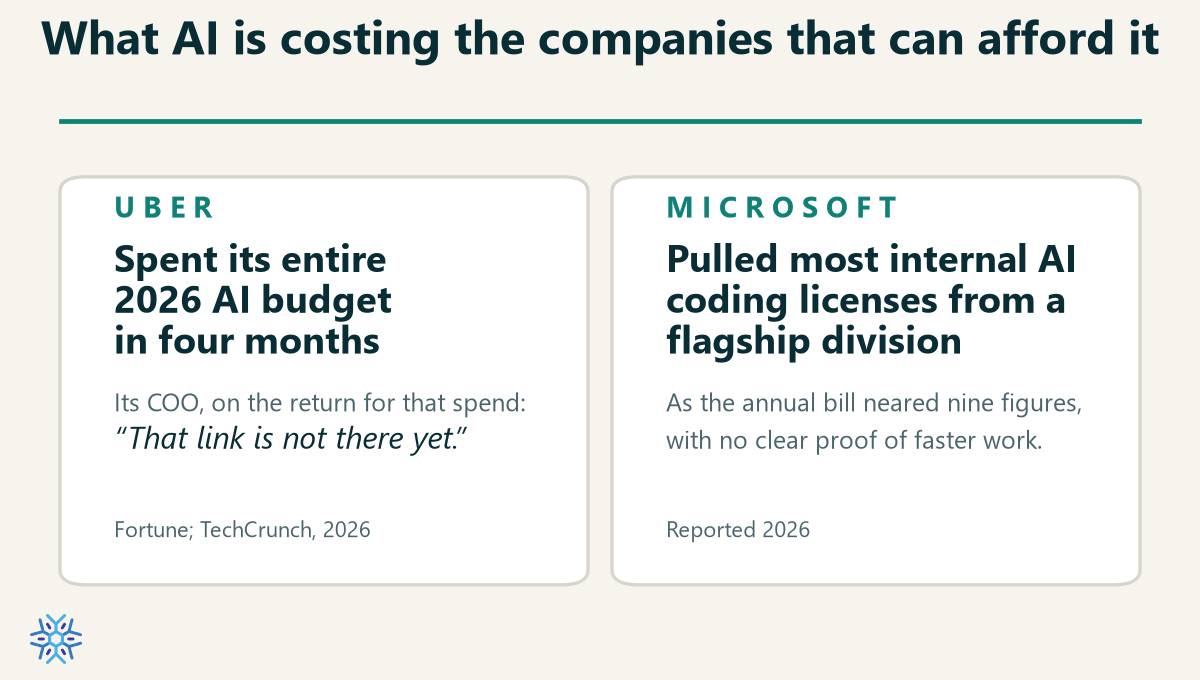
In April, merely four months into the year, Uber said it had already spent its entire 2026 AI budget. Soon after, the company capped what each engineer could spend, and its chief operating officer said he couldn’t draw a clear line between the rising bill for AI coding tools and anything a customer would notice. “That link is not there yet,” he said.
Microsoft followed suit around the same time by pulling most of the internal AI coding licenses from one of its largest divisions, the group that builds Windows, Office, and Teams, after the annual bill started tracking toward nine figures with no firm evidence the work was getting faster.
Attention grabbing for sure, as these are sophisticated technology companies. The AI bill surprised them, likely because of how well-hidden the cost of this technology is.
Most people never see the cash cost because they don’t have to pony up when the invoice arrives. Blissfully unaware for awhile, but then it hits like a ton of bricks. What would you do if you had built a production-used AI automation running on top of Claude Code that was suddenly yanked because it was so cost inefficient? You’re back to the manual grind and worse off for having tasted the sweet feeling of relief that accompanies successful delegation of the work to the machine.
Clear Costs That Aren’t Hidden
I ran the same tax workflow several ways and measured the model cost of each. The inputs were identical and so was the output, a review-ready deliverable that a professional signs off on before it reaches the client. The full study behind these runs is on this site: Why pure agents are not enough.
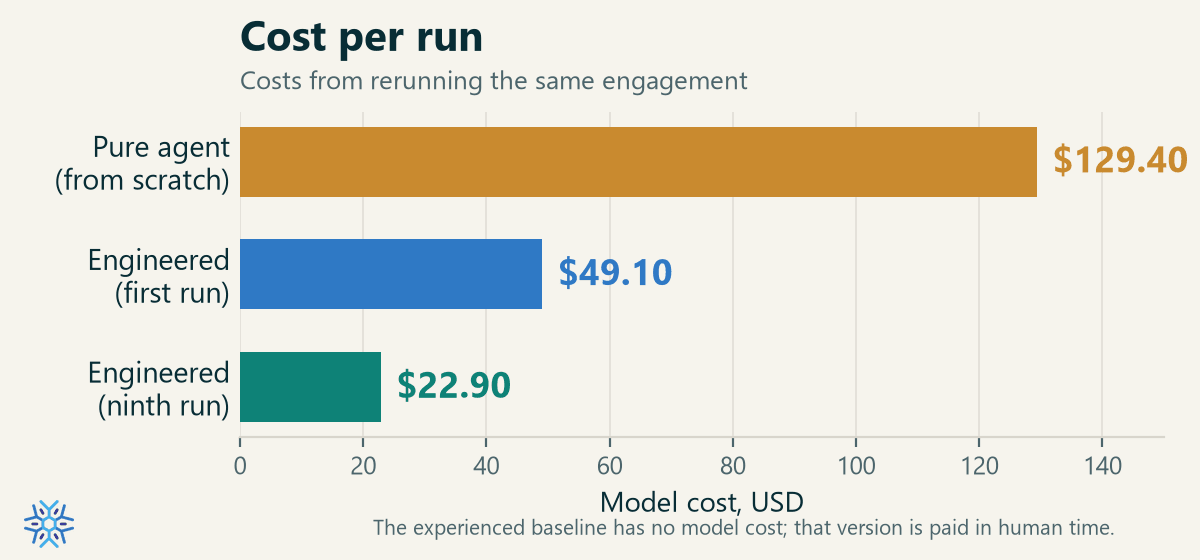
Based on Claude API pricing for Opus 4.8
The engineered workflow, code doing the repetitive work with AI orchestrating it, cost $49.10 the first time I ran it. By the ninth run it was 53.4% cheaper at $22.90, and still falling. The same engagement handed to a single AI agent, doing everything itself from scratch, cost $129.40. That’s 465% more revenue going to the AI company; you could only dream of that kind of return in your portfolio!
The engineered approach got cheaper every time I refined it. The pure-agent approach remained stubbornly high. To understand why, you have to be clear about what an AI actually does when it does your work.
AI Thinks. Code Does.
You’ll observe this if you watch agents perform the work:
The AI itself never touches your files. It does not open your workbook or click a button in your tax software. It can’t. What a model produces is text. It reasons, and it produces instructions. Everything that actually happens to your data happens in code that runs. The AI must write a script to read and extract data from a PDF, another one to foot the column, again to write the upload file, and finally one to drive the CSV import.
So every action an AI appears to perform is really code being executed on its behalf. The model’s job is to decide which code to run, and to write that code when it doesn’t already exist. The thinking is the model’s. The doing is the code’s.
Watch the agent next time, you’ll see this is true, and that’s the primary reason the cost is so different.
AI-driven “Computer Use” is slow and expensive
The most expensive thing the agent did in my run was drive the web-based TaxPrep software by ‘looking’ at it. It has no direct connection to that application, so it operated the way you would describe a task to someone over the phone. It takes a screenshot, sends the picture to the model, lets the model’s vision work out what is on the screen, decides the next click, and acts before taking another screenshot. Every step costs 2x, once for the image and once for the reasoning about it. And it gets worse, because each screenshot stays in the running context and is re-read on every turn that follows. By the end of the run, the majority of the bill was the model re-reading a growing stack of pictures of a web application.
A script that reads the same page’s structure directly, and clicks without requiring any AI, does the identical work for the cost of electricity. Driving an app by looking at it costs far more than driving it with code.
Rewriting the Doer, Every Time
The second reason the agent cost what it did is more fundamental and easy to control when it comes to your budget.
The agent wrote all of its own code from scratch, on every run. It had nothing pre-built to call. So for each piece of the job it reasoned out what code was needed, wrote it, ran it, checked the result, found the problem, fixed it, and ran it again, cycle after cycle until the numbers came out right.
And to be clear, it got there. I want to be careful not to undersell it, because the capability really was there. The agent reached a correct result, and it did so while figuring out how to navigate TaxPrep on the web, and reasoning through a genuine judgment call. It had to size the discretionary SR&ED deduction that could land anywhere from nothing to the full amount, which can require some thoughtful reasoning.
The prompt that made this possible was not a casual instruction. It ran to roughly 5,100 words, longer than the article you’re reading, and that had undergone multiple runs to correct failures and make it more reliable. Pointed carefully enough, a single agent can do remarkable work.
But it pays the full cost of discovery on every run, because it keeps very little for future reuse.
Memory
Some AI platforms attempt to squirrel various solutions or nuances away into memory. That is a double-edged sword because the next run can be improved by cobbling together a faulty prompt with patches taken from memory. But real fixes that should be codified end up in memory instead of the prompt and other specifics that were narrowly applicable trip up the agent, costing time and effort for the agent to fix…that is, costing more on your bill. So disable the memory, but then run the same engagement next quarter and it derives the whole process again, from the beginning, as if it had never seen it. So either the agent trips up when it tries to learn, or the agent does not get better at your work by doing it. It relearns it, at full price, every time.
Linear With Curiosity, Quadratic With Inefficiency
How else do costs grow? A useful rule of thumb has come out of this.
The cost of AI scales linearly with your team’s curiosity, and quadratically with its inefficiency.
The first half is straightforward. Each new question is a roughly fixed amount of work for the model. Ask twice as many and you pay about twice as much. Cost rises with how much you ask and experiment, which is the curiosity.
The second half is where the surprise lives. Inefficiency here means leaning on the model to find its own way instead of giving it structure, and it compounds in two directions at once. Within a single task, the model re-reads its entire growing context on every turn, so a job that takes more turns, with all its retries and dead ends, costs more per turn and more turns at the same time. Those multiply. A run that takes twice as long to find its footing can cost roughly four times as much.
Across tasks, the instinct to go faster makes it worse. To parallelize, these systems fan out several sub-agents, each re-reading the shared context, then add another agent to stitch their answers together. The token count grows with the number of agents times the size of the context they each carry. The work looks faster while the bill compounds underneath it.
A workflow can run faster and cost far more in the same motion.
That is the trap. I think of “efficiency” as fast and inexpensive without sacrificing quality. Speed and cost look like the same lever, and they are not.
The Solution Is Not a Mystery
None of this is an argument against the agent. It was remarkably capable, and with more work on the prompt, and run overnight where the clock doesn’t matter, I believe it could reach a perfect result. But when we must cap costs, the fix is not mysterious.
Point the model towards writing the code that actually executes the work (the doer).
Tokens you spend writing code are spent once. The code runs for free and needs only a little maintenance. Tokens you spend asking an agent to re-derive that same work are spent every engagement, forever. With each run, you are choosing whether the model is building you an asset or draining your piggy bank.
This is exactly how the falling cost of the engineered workflow happened. With each discovery run, I moved repetitive actions, piece by piece, out of the model and into code. Each parser or footing check I captured was one less thing the agent had to rediscover or rewrite.
Play that forward across a season of engagements and the two paths separate completely.
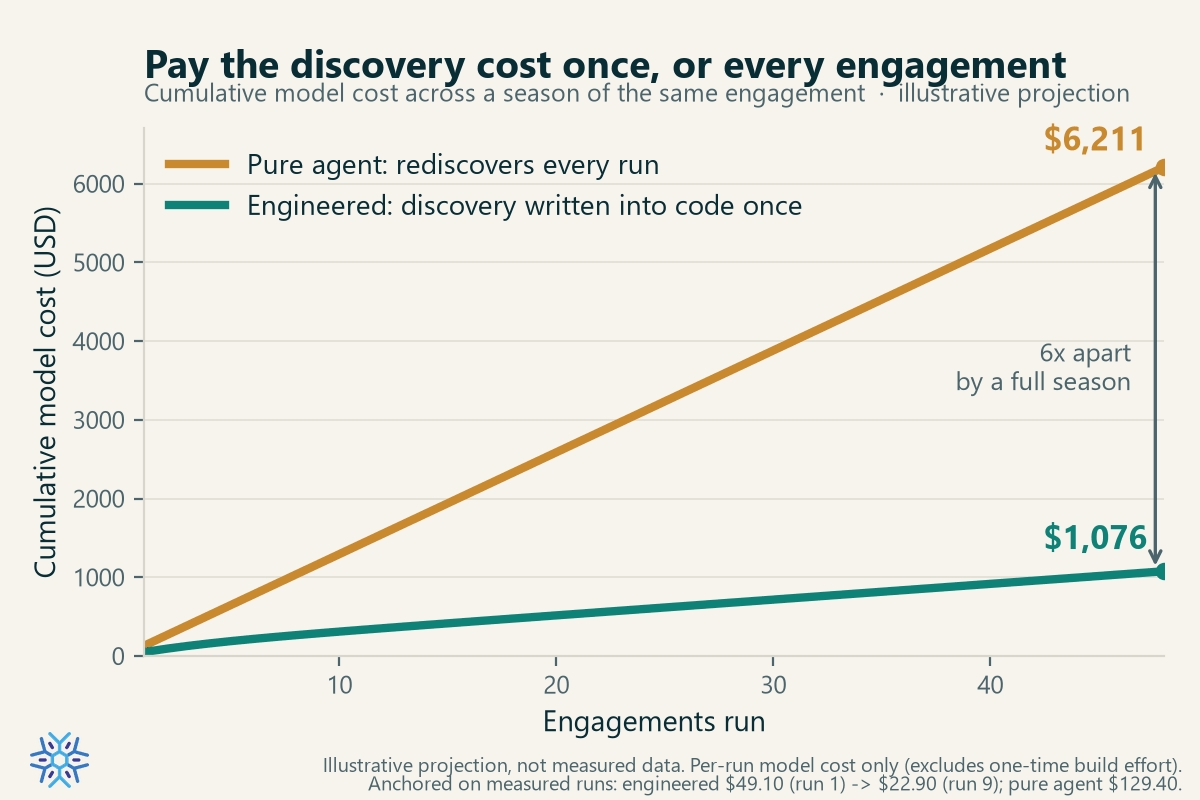
This projection is based on real measurement, and it’s only for one of the Firm’s engagement lines. As we expand automation to more workflows, soon the Firm’s AI costs will rival the salary of an FTE. This direction is not in doubt. One line is the cost of building the doer once and running it cheaply forever after. The other is the cost of rebuilding it from scratch every time.
You Can Start Today, and You Don’t Need a Platform
You might read all this and decide it isn’t your problem yet, because no one has handed your team an agentic platform. No Claude Code or Codex, no license to run autonomous agents on your data.
It also doesn’t matter for where you should start.
The doer is just code, and you can write code with AI today. An ordinary AI assistant that drafts a Python script or a VBA macro needs none of that platform. Most of the throughput in my engineered run was plain code doing plain work:
- moving and renaming files into appropriate folders,
- parsing source documents to extract data,
- populating a templated workbook,
- populating TaxPrep templates for upload,
- uploading and exporting data from TaxPrep,
- arithmetic verification gates, etc…
And none of it required an agent to run. You can build that part now, on the chassis you already own.
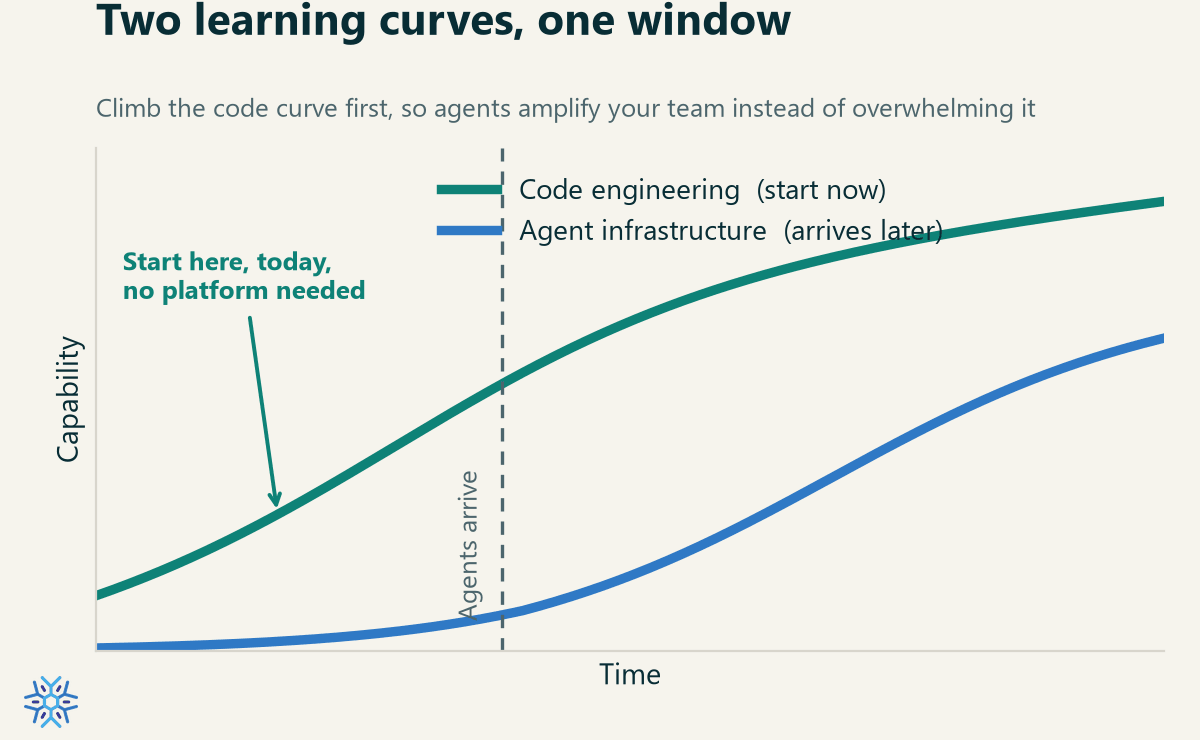
Pointing the AI at writing code is where your learning curve for “how to use it” and “where to put it to use” gains momentum. You get comfortable describing what you want and learning when to trust what comes back. That curve is the same size whether the automation connects two workbooks or runs a whole engagement. Pay it on something small this quarter and then do it again on something else, but when your starting point is higher up the curve. Wait, and you will be climbing it for the first time at exactly the moment the stakes are highest and the agentic infrastructure you’re supposed to use has finally arrived. You do not need the whole automated floor to start connecting two machines.
What It Means for Your Budget
Capability was never going to be the question. These tools are capable, and they get more capable every few months. The boring question a tax department will have to answer is about cost structure, and it’s very solvable.
First build the asset that compounds in your favor. Don’t and you risk repeating the same surprises as Uber and Microsoft.